


Vente chaude
Application

Phone:+86-15215969856 E-Mail: 396838165@qq.com
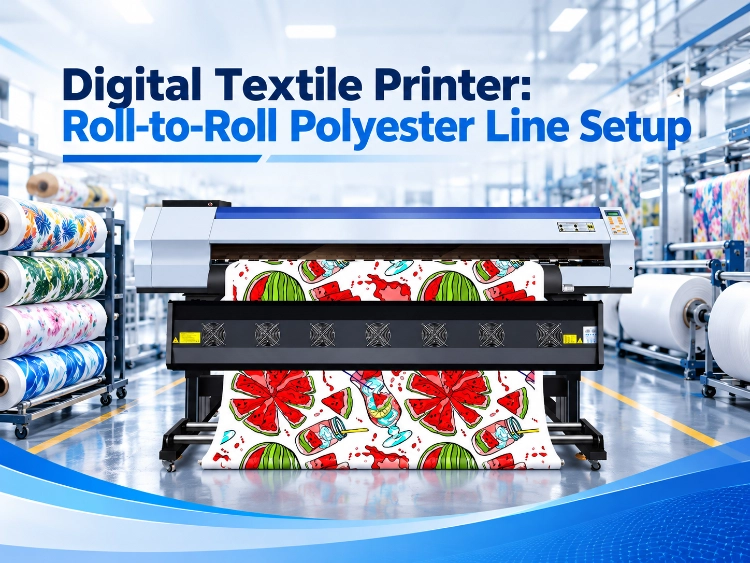
A factory owner showed us his new printer with real pride, and he had reason to be: it printed twice as fast as the machine it replaced. Then he walked us twenty steps to his calender, which was nine years old and in no hurry at all. His line did not run at the new printer’s speed. It ran at the old calender’s speed, with printed rolls stacked on the floor in between, waiting.
A digital textile printer is one machine in a line of three — printer, paper, calender — and the line only moves as fast as the slowest of them. Setting up a roll-to-roll polyester line is mostly arithmetic: three widths that have to agree, and two speeds quoted in different units that have to be converted before they can be compared. This is the order we work through it with buyers.
A production line is three widths and two speeds
Widths first, because they cannot be negotiated later
The printer’s working width is the ceiling of the whole line. In the CF-2000 class it is 1900 mm; the CF-6000 works at an effective 1800 mm. Paper has to fit under that ceiling and over the fabric: our roll table tops out at 183 and 190 cm for exactly this reason, with 162 cm the width most garment lines settle on. The calender closes the chain. The JM range runs at effective widths of 1700 and 1900 mm, and its working width has to cover the printed area, not the paper edge — a 1900 mm printer feeding a 1700 mm calender means the outer 200 mm of every print is decoration.
Buyers usually check two of the three widths and discover the third at installation. Check all three on one page, before any deposit: printer width, the paper width you will actually order, calender width. If one of them is smaller than the work you sell, that one is your line, whatever the other two say. The full machine range behind those widths is listed on the sublimation printer range page.
Speeds second, because the units lie
Printer speeds are quoted in square metres per hour. Calender speeds are quoted in metres per hour. Put side by side on two quotations they look comparable and they are not — the conversion runs through the print width, and skipping it is how factories end up with a queue of printed rolls.
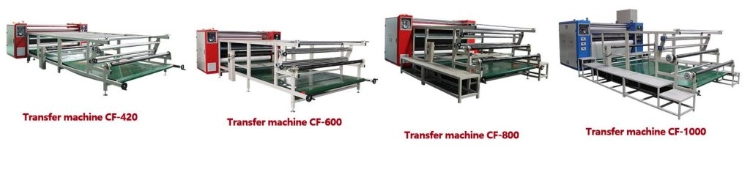
Work it once with real numbers. The CF-3000 prints 162㎡/h in 2PASS across 1900 mm, which is about 85 metres of paper an hour. The JM-420 calender transfers 80 to 200 m/h, so it keeps up, with its nose just above the waterline; the JM-600, at 120 to 300 m/h, keeps up comfortably and leaves room for the printer to be run harder. Step up to a CF-6000 at 200㎡/h over 1800 mm — roughly 111 m/h — and the JM-420 is underwater at its realistic settings while the JM-600 still breathes. At the sampling end, a CF-2000 at 105㎡/h is about 55 m/h of paper, which a JM-420 handles without waking up, and even the JM-200 at 20 to 60 m/h can follow for sample work. There is no good or bad machine in that table. There is only matched and mismatched.
The order we set a line up in
Start from the fabric and the month, not from a model name
We ask two questions before any model gets mentioned. What fabric width carries your orders, and how many metres a month actually leave the building? The answers sort the printer range faster than any catalogue. Sampling rooms and small-batch sportswear live happily on a CF-2000: two Epson I3200-A1 heads, 105㎡/h in 2PASS, a machine a small crew can run and feed. Regular daily production belongs a class up, on the CF-3000’s three heads and 162㎡/h. Bulk and deadline work — exhibition fabric, long-roll textile orders — is where the six-head CF-6000 and the 5198-8 and 6198-8 models earn their floor space, at 200㎡/h in 1PASS. Buying one class too high is as expensive as buying one too low; it just fails more quietly, in floor space and spare heads instead of late orders. The model-by-model comparison — speed, width and maintenance cost — sits in our sublimation printer buying guide; this article starts where that one ends, at the moment the chosen machine has to agree with everything around it.
Then the room, the power and the warm-up
A line is also a room. The printers work at 18 to 30°C and 35 to 65% humidity, and they sulk outside it — ink behaviour, paper flatness and colour repeatability all drift before anything actually breaks. Power sorts itself into two very different bills: the printer side is modest, 750 to 1,000 W for the machine plus up to 3,600 W for its dryer, while the calender is the heavy load, 28 kW for a JM-420 up to 56 kW for the JM-800 roll heat transfer machine on three-phase supply. And the calender needs about an hour to come up to working temperature, which is a scheduling fact: a line that presses from nine in the morning lights its calender at eight.
Then close the consumables loop
Last, the things that run out. Paper width and grade get locked to the printer when the line is specified — a line built around 162 cm 50gsm jumbo roll sublimation paper should not be re-planned around a different width at the first reorder. The grade-by-grade width table behind that lock-in is our sublimation paper sizes guide. Protective tissue runs on the calender at the same widths, 160 to 182 cm, and belongs in the same order conversation. On the printer, the unglamorous features decide uptime: siphon ink supply with four 3-litre cartridges on the CF-2000 class, automatic cleaning and a sealed moisturising ink stack that keeps heads alive over a weekend, an ink-shortage alarm instead of a man with a torch. At Changfa numérique the RIP side is standardised too — Maintop 6.1 supplied, Photoprint, ONYX and NeoStampa supported — so the computer desk does not become the fourth machine in the line that nobody specified.
Conclusion
Set the line up in the order the constraints bite: fabric width and monthly metres choose the printer class; printer width, paper width and calender width get checked on one page; printer speed gets converted into metres per hour and matched against the calender’s honest range; then the room, the power and the consumables get closed before the first roll is printed. Send us your fabric widths, your realistic monthly metres, and what is standing on your floor today. We will spec the line — printer, paper, calender — as one set of numbers that agree with each other, and flag the one machine in your current setup that would hold the rest back.
Questions fréquentes
Q1: How do we choose between the CF-2000, CF-3000 and CF-6000 classes?
A1: By monthly output at working settings, not by the badge. Sampling and small batches fit the CF-2000 at 105㎡/h in 2PASS. Regular daily production fits the CF-3000 at 162㎡/h. Sustained bulk work fits the CF-6000 class at 200㎡/h in 1PASS — provided the calender behind it can transfer at the matching metres per hour.
Q2: Can one calender serve two printers?
A2: Only if its metres per hour cover both printers running together. Convert each printer’s speed at your working width — a CF-3000 is about 85 m/h of paper at 1900 mm — and add them. Two CF-3000s want roughly 170 m/h of transfer, which is JM-600 or JM-800 territory, not a JM-420.
Q3: What else has to be specified besides the printer and calender?
A3: The paper width and grade, the protective tissue width, the ink supply arrangement, and the RIP workstation — our printers ship with Maintop 6.1 and want a Windows 10 64-bit machine with a quad-core i5 or i7, 8 GB of memory and a gigabit network connection. Lines rarely fail on the big machines; they fail on the unspecified small ones.


