


Vente chaude
Application
Phone:+86-15215969856 E-Mail: 396838165@qq.com
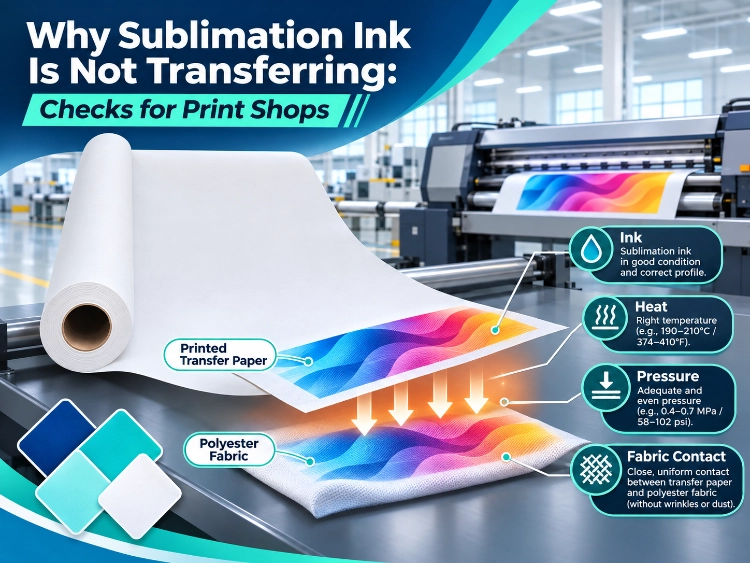
A failed transfer announces itself in the used paper. On a healthy run, the sheet that comes off the press carries a faint ghost of the image, because a rated paper gives up 95–98% of its dye at the standard condition of 225°C for about 20 seconds. When sublimation ink is not transferring, the dye is still sitting in the paper, and the print on the fabric is weak, patchy or missing in places. The checks below work through the causes in the order a production shop can test them: what the failure pattern says, then the paper, the press, the fabric and the ink load. Each check ends with the adjustment it points to, so a line operator can run the sequence on a live job instead of changing settings at random.
This article covers dye that never leaves the paper or never bonds. Colour that transfers and then reads dull or shifted is a different fault, and double images from a second transfer are a different fault again; neither is treated here.
Read the Failure Pattern First
The Whole Print Is Pale
Uniform weakness across the full width and length points at the transfer condition itself: the fabric never received the full heat and time the dye needs, or the fabric cannot take the dye. Start with the press checks and the fabric check below before touching the paper. A pale print with a strongly coloured used sheet confirms the dye stayed in the paper rather than moving and failing to show.
The Print Is Patchy or Cloudy
Uneven patches that do not follow the artwork point at the paper’s moisture state. Sublimation paper that has absorbed moisture transfers unevenly, because the damp areas hold the dye back and release it late. Patchiness that changes from roll to roll, or that worsens after a roll has stood open in the workshop, is the signature of this cause rather than a press fault.
One Edge or One End Is Weak
Weakness that follows the machine geometry — one selvedge pale along the whole run, or the leading metres weaker than the rest — points at the press. Calender rollers and flatbed platens do not hold one temperature across their full width, and the edges run cooler. A fault that maps to the machine rather than the artwork is a press measurement job, not a materials change.
|
Failure pattern |
First cause to test |
Where the check sits |
|
Whole print pale, used paper still strongly coloured |
Heat, dwell or fabric composition |
Press and fabric checks |
|
Patchy, cloudy, changes between rolls |
Paper moisture |
Paper check |
|
One edge weak along the full run |
Press temperature uniformity |
Press check |
|
Weak only where coverage is heaviest |
Ink load above the paper grade’s rating |
Ink load check |
|
Sharp print, dye visible on used paper in solid blocks |
Transfer stopped short of the rated condition |
Press check, then paper check |
The Paper Check: Moisture and Storage
Sublimation paper is specified to be kept sealed, dry and flat, at around 40–50% humidity. A roll that stands unsealed in a humid workshop takes on moisture through its exposed end and outer wraps, and the coating then releases dye unevenly: some areas transfer fully, some hold back, and the fabric shows clouds that no press adjustment removes. The test is substitution. Run the same artwork, on the same fabric and settings, from a fresh sealed roll of the same grade. If the patchiness disappears, the open roll was the fault, and the fix is storage discipline — reseal opened rolls, keep them off the floor and away from exterior walls, and use the oldest stock first — rather than new press settings.
Moisture also explains failures that arrive with the weather. A shop whose transfer quality drops in the humid season and recovers in the dry season is usually looking at paper storage, and the pattern in the table above separates it from a press that is drifting out of calibration at the same time.
The Press Checks: Temperature, Dwell and Contact
Actual Temperature Against Set Temperature
The rated transfer condition for the papier de sublimation grades in the Changfa Digital range is 225°C for about 20 seconds, inside a working window of 200–250°C. Those figures describe the temperature at the paper, not the number on the controller. Platens and rollers lose heat to the room and to the material passing through them, and a controller reading 225°C can deliver materially less at the surface, above all near the edges and at the start of a shift before the machine has soaked through. Measure the surface with a contact probe or temperature strips at left, centre and right. A spread across the width explains edge weakness; a uniform shortfall explains a whole pale print.
Dwell Is Time Under Heat, Not a Dial Setting
On a flatbed press, dwell is the closed time. On a calender, dwell is set by roller diameter and line speed: the same nominal temperature transfers less dye when the line runs faster. A shop that raised throughput by speeding up the calender and then saw transfer weaken has changed the transfer condition, and the correction is to restore the time or raise the temperature within the 200–250°C window to compensate — one variable at a time, with a test length run after each change.
Contact Across the Full Width
Dye moves from paper to fabric across a contact interface. Wrinkled paper, a fabric that shifts on the belt, or uneven pressure lifts the paper off the fabric in lanes, and those lanes transfer weakly in straight bands that follow the feed direction. Bands of this kind are a handling fault: check paper flatness at the infeed, fabric tension, and that the printed sheet is not cockling under heavy ink before it reaches the nip.
The Fabric Check: Polyester Content Sets the Ceiling
Sublimation dye bonds into polyester. It does not bond into cotton or other natural fibres, which carry no dye away from the paper surface at all. On a blended fabric, only the polyester fraction takes colour, so a 50% polyester fabric has a ceiling near half the depth of a full-polyester print at the same condition, and no press adjustment raises it. When a whole print is pale and the press measures correctly, read the fabric specification before changing anything else: a fabric change upstream, or a blend substituted for a full-polyester cloth, produces exactly this failure and is regularly misdiagnosed as a paper problem. The check costs one look at the fabric’s delivery note.
The Ink Load Check: Coverage Against the Paper Grade
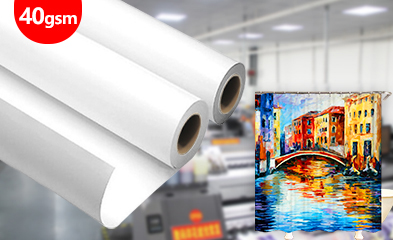
A paper grade holds a rated amount of ink. On the Changfa numérique range the maximum-ink-volume rating rises with weight: the 40gsm grade carries two stars, the 50gsm carries three, and the 100gsm grade carries five. Artwork whose heaviest blocks exceed the grade’s rating leaves dye pooled on the coating; under heat that excess transfers unevenly or stays behind, and the weak areas map to the artwork’s darkest blocks rather than to the machine or the roll. The fix is to match the grade to the coverage — heavier grades for solid, saturated work — or to reduce the ink limit in the print profile for the grade in use. Changing temperature does not repair an overload.
Conclusion
Work the checks in order: read the pattern, substitute a sealed roll to clear the paper, measure the press surface rather than its display, confirm the fabric’s polyester content, and weigh the artwork’s heaviest coverage against the paper grade’s ink rating. Most transfer failures resolve at one of these five points, and the pattern table keeps each test tied to the cause it can actually prove. If a run is still not transferring after the sequence, send the printer and printhead model, the paper grade and width, the fabric and its polyester content, the press type with its set and measured temperatures, and a description of the failure pattern, and the remaining variable can be isolated from those figures.
Questions fréquentes
Q1: Why is my sublimation not transferring in patches?
A1: Patchy transfer that changes between rolls is most often paper moisture. Sublimation paper is kept sealed at around 40–50% humidity; a roll left open in a humid workshop absorbs moisture and releases dye unevenly. Test with a fresh sealed roll of the same grade before changing press settings.
Q2: The press shows 225°C. Why is the transfer still weak?
A2: The controller figure is not the surface temperature. Platens and calender rollers lose heat, especially at the edges and before the machine has fully soaked. Measure the surface at left, centre and right with a probe or temperature strips; a shortfall or a spread across the width explains weak transfer at a correct-looking setting.
Q3: Can more heat fix a pale print on blended fabric?
A3: No. Sublimation dye bonds only into polyester, so the polyester fraction of a blend sets the maximum colour depth. More heat or longer dwell cannot move dye into cotton fibre; the fabric specification has to change, or the expected depth has to be set by the blend ratio.
Q4: Why is transfer weakest exactly where the artwork is darkest?
A4: Heavy blocks carry the most ink, and a paper grade holds a rated maximum. Above that rating, dye pools on the coating and transfers unevenly or stays in the paper. Match the grade to the coverage — on this range the ink rating rises from two stars at 40gsm to five stars at 100gsm — or lower the ink limit in the profile.


