


Probleme mit der Schwarzausgabe: Wie können Lieferanten die Farbstabilität verbessern?
Heißer Verkauf
ANWENDUNG
Phone:+86-15215969856 E-Mail: 396838165@qq.com
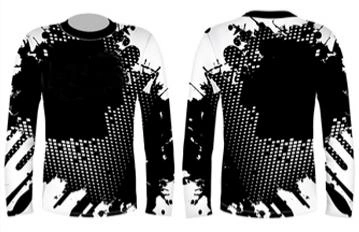
Schwarz ist oft die erste Farbe, die Schwachstellen im Sublimationsprozess offenbart. Eine geringfügige Farbabweichung, die bei hellen Grafiken leicht zu übersehen ist, wird auf einem komplett schwarzen Panel, einem dunklen Sportbekleidungsdesign oder einer im Tageslicht betrachteten Flagge deutlich sichtbar.
Warum Schwarz beim Sublimationsdruck schwieriger zu kontrollieren ist
Ein überzeugendes Schwarz erfordert eine hohe und gleichmäßige Farbstoffmenge. Dadurch ist es weniger tolerant als die meisten anderen Farben. Trocknet das bedruckte Papier nicht gleichmäßig, schwächelt eine Düse oder ist der Wärmetransfer nur geringfügig beeinträchtigt, verliert das Schwarz an Farbtiefe, bevor der Bediener einen offensichtlichen Fehler an anderer Stelle bemerkt.
Der Transferprozess bringt eine weitere Variable ins Spiel. Die Sublimationsfarbe muss unter konstanter Temperatur, Einwirkzeit und konstantem Druck vom Papier in die Polyesterfaser oder eine beschichtete Oberfläche gelangen. Ein blasses Schwarz kann durch unzureichenden Transfer verursacht werden, aber auch ein bläuliches, grünes oder rötliches Schwarz kann auf ein bereits im Druckbild vorhandenes Ungleichgewicht zurückzuführen sein.
Deshalb reicht ein normales, farbiges Freigabemuster für Arbeiten mit hohem Schwarzanteil nicht aus. Der Test erfordert gedeckte Flächen, feine dunkle Linien, große Farbflächen und denselben Stoff, der auch für die Produktion verwendet wird. Ein Muster, das einen Modedruck besteht, kann bei einem schwarzen Teamtrikot oder einer dichten Textilgrafik dennoch Probleme bereiten.
Häufige Probleme mit der schwarzen Produktion in Produktionslinien
|
Was erscheint |
Wahrscheinliche Produktionsursache |
Vor dem Tintenwechsel prüfen |
|
Grau oder schwach schwarz |
Geringe Übertragungsenergie, geringe Tintenbegrenzung, Stoffvariation |
Transferplatte, Druck, Verweilzeit, Stoffcharge |
|
Bänder in festen Bereichen |
Düsenverlust, Zuführungsinstabilität, Druckmodus |
Düsentest, Langzeitleistung, Tintenversorgung |
|
Schatten oder Doppelkante |
Nassdruck, Wickelkontakt, Bahnbewegung |
Trocknungszustand, Walzenspannung, Tuchweg |
Instabile Dichte, Grauschleier und Farbstiche
Ein häufig geäußerter Kritikpunkt ist die Verwendung von „aschschwarz“: Das Bild wirkt auf dem Papier dunkel, wird aber weniger farbintensiv übertragen als im vorgegebenen Standard vorgesehen. Mögliche Ursachen sind eine zu geringe Farbmenge, eine schwache Farbübertragung, mangelhafter Kontakt durch das Gummituch oder ein Stoff, der die Farbe nicht so gut aufnimmt wie die Farbmustercharge.
Farbstiche sind etwas anderes. Ein Schwarz mit einem Blau-, Rot- oder Grünstich deutet in der Regel auf ein Ungleichgewicht zwischen den Kanälen, eine Profilabweichung oder einen ungleichmäßigen Zustand des Druckkopfes hin. Er kann auch sichtbar werden, wenn ein hochdeckender Abzug ungleichmäßig trocknet und der Transfervorgang den Unterschied verstärkt.
Geringe Tintendeckung, Streifenbildung und Geisterbilder
Eine zu geringe Farbdeckung lässt Schwarz blass wirken, selbst wenn die Grafik eine dichte Füllung erfordert. Eine Erhöhung des Limits ohne Überprüfung des restlichen Druckbildes kann das Problem verschlimmern. Das Papier kann feucht bleiben, die Druckbahn kann beim Aufwickeln Spuren hinterlassen, und Details an den Rändern können verlaufen, bevor die Farbe die Transferpresse erreicht.
Streifenbildung ist besonders auf großen, dunklen Flächen sichtbar. Eine schwache Düse, ein instabiler Tintenfluss, ein Problem mit dem Druckkopf oder ein ungeeigneter Druckmodus können helle Streifen hinterlassen, die vor dem Transfer leicht übersehen werden können. Geisterbilder haben in der Regel eine andere Ursache: Die bedruckte Bahn bewegt sich, berührt sich oder verschiebt sich im heißen Zustand, wodurch ein Schattenbild neben den ursprünglichen Details entsteht.
1. Passen Sie Tinte und Tintenbegrenzung an die Linie an.
Die erste Lösung ist nicht immer mehr Tinte. Prüfen Sie zunächst, ob die Tintenformulierung zur Druckkopfanordnung und Produktionslast passt. Bei herkömmlichen Epson I-3200-Systemen mit zwei bis vier Druckköpfen kann eine Standardformulierung für ein saubereres Druckergebnis sorgen. Größere Epson I-3200-Systeme mit acht oder mehr Druckköpfen oder Atexco-Kyocera-Systeme benötigen unter Umständen eine höhere Tintendichte, wenn sowohl die Deckkraft in dunklen Bereichen als auch die Ausgabemenge steigen.
Changfa Digital Dies spiegelt die Unterscheidung zwischen regulären und hochdichten Sublimationstintenanwendungen wider. Die Tintenreihe verwendet CMYK-Formulierungen, die für die kontinuierliche Textilproduktion entwickelt wurden, wobei die Schwarzdeckung nach dem Transfer ein zentrales Leistungsmerkmal und nicht nur ein kosmetisches Verkaufsargument ist.
Die Tintenmenge sollte in kleinen, kontrollierten Schritten erhöht werden. Prüfen Sie bei jedem Schritt die Papiertrockenheit vor dem Aufwickeln, die Gleichmäßigkeit der dunklen Bereiche, die Ausbreitung feiner Linien und die Schwarzdarstellung auf dem Zielgewebe. Wenn das Bild auf dem Papier dichter wird, nach dem Transfer aber fleckig erscheint, liegt das Problem in der Regel an der Verarbeitungskapazität und nicht an Tintenmangel.
2. Druckköpfe und Papier auch bei hoher Tintenbelastung stabil halten
Überprüfen Sie den Druckkopf, bevor Sie die Tinte verantwortlich machen.
Führen Sie einen Düsentest beim Anfahren, nach Erreichen der Normalgeschwindigkeit und gegen Ende der Rollenlänge durch. Changfas Sublimationstinte beinhaltet einen kontinuierlichen Drucktest mit 360 dpi über 20 Meter als Leistungsbenchmark, dennoch benötigt jede Produktionslinie einen eigenen Langzeittest. Ein einzelnes gutes Düsenmuster zu Beginn beweist nicht, dass Zuführung und Druckkopf auch bei einem dichten schwarzen Druckauftrag stabil bleiben.
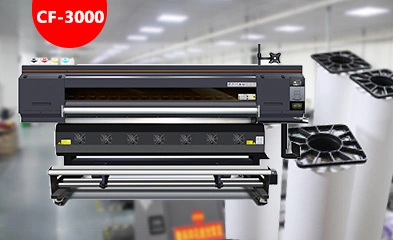
Ordnen Sie den Test dem tatsächlichen Test zu. Sublimationsdrucker Konfiguration und Druckmodus. Protokollieren Sie die Druckkopfreinigung, die Raumtemperatur, das Tintenzufuhrverhalten und den Beginn eventueller Streifen. Diese Protokolle helfen, ein Wartungsproblem von einem Papier- oder Übertragungsproblem zu unterscheiden, bevor ein Kunde mehrere Variablen gleichzeitig ändert.
Wählen Sie Papier, das auch dunkle Kunstwerke gut wiedergibt.
Dunkle Grafiken stellen höhere Anforderungen an das Trägerpapier. Die Beschichtung muss die vorgegebene Farbmenge aufnehmen können, ohne dass es zu Pfützenbildung, langsamer Trocknung oder ungleichmäßiger Farbübertragung kommt. Ein Papier, das nur aufgrund des Stückpreises ausgewählt wird, kann zu Ausschuss führen, wenn schwarze Flächen sich wellen, Flecken verursachen oder eine feuchte Oberfläche entsteht, die die nächste Schicht auf der Rolle verunreinigt.
Vergleichen Sie daher die ausgewählten Sublimationspapier Changfa Digital verwendet reale Deckkraft anstelle einer Farbtabelle mit geringem Tintenverbrauch. Gängige Papiergewichte von 40 g/m² bis 100 g/m² und Breiten von 61 cm bis 320 cm sind verfügbar, sodass das Papier optimal auf Druckerbreite, Produktionsgeschwindigkeit und Stofflayout abgestimmt werden kann. Hohe Tintenkapazität und schnelle Trocknung sind besonders wichtig, wenn die Datei große schwarze Flächen enthält.
3. Optimieren Sie die Wärmeübertragung für ein tieferes, gleichmäßigeres Schwarz.
Die Wärmeübertragung kann einen instabilen Druck nicht retten, aber einen guten Druck entweder erhalten oder schwächen. Temperatur, Einwirkzeit, Druck, Zustand des Gummituchs und Bahnspannung müssen optimal aufeinander abgestimmt sein. Bei ungleichmäßigem Druck über eine breite Rolle kann Schwarz in der Mitte akzeptabel aussehen, während es an einem Rand verwaschen wirkt.
Verwenden Sie Transferplatten von links, der Mitte und rechts. Vergleichen Sie dasselbe schwarze Motiv nach normaler Laufzeit, nicht nur nach dem Abkühlen der Maschine. Prüfen Sie, ob die Oberfläche vollständig übertragen wurde, ob dunkle Ränder verlaufen sind und ob ein Farbstich auf einer Seite stärker ist. Diese Details weisen auf ein Problem mit den Transfereinstellungen oder dem Maschinenzustand hin, bevor ein Farbwechsel bestellt wird.
4. Erstellen Sie einen Test speziell für schwarze Produkte vor der Massenproduktion.
Ein praktischer Schwarzdrucktest ist kurz genug, um vor der Freigabe durchgeführt zu werden, aber anspruchsvoll genug, um Schwachstellen aufzudecken. Verwenden Sie die vorgesehene Druckdatei oder ein Testmuster mit schwarzen Flächen, kleiner dunkler Schrift, Farbverläufen ins Schwarze und Kantendetails. Drucken Sie Anfangs-, Mittel- und Endabschnitte und übertragen Sie diese anschließend auf das Polyestergewebe oder beschichtete Material.
Bewahren Sie ein freigegebenes Transferpanel als physische Referenz auf. Vergleichen Sie Dichte, Farbton, Kanten, Streifenbildung und Geisterbilder damit, bevor die Bestellung freigegeben wird. Dieser einfache Schritt ist zuverlässiger als die Freigabe eines normalen Farbmusters in der Annahme, Schwarz verhalte sich genauso.
Wenn für den Auftrag eine spezielle Papierbreite, ein spezielles Rollenformat oder eine Testkombination benötigt wird, Changfa Digital Service Support Dies kann in die Beispieldiskussion einbezogen werden. Das Unternehmen fertigt Basispapier, Beschichtung, Schneiden und Verpacken im eigenen Haus und verfügt über vier Beschichtungslinien, vier Schneidehallen und zehn Schneidemaschinen. Dies ist relevant, wenn eine getestete Kombination für spätere Großlieferungen wiederholt und nicht nur einmal freigegeben werden muss.
Die Schwarzwiedergabe wird stabil, wenn Tinte, Druckkopf, Papier, Trocknungskapazität, Transfereinstellungen und Stoff als ein Produktionssystem betrachtet werden. Ein tieferes Schwarz entsteht nicht einfach durch mehr Tinte. Es erfordert die Wahl einer passenden Formulierung, die Einhaltung optimaler Betriebsbedingungen und das Testen der dunklen Grafiken, die im Auftrag tatsächlich gedruckt werden sollen.
FAQ (häufig gestellte Fragen)
Frage 1: Warum sieht Schwarz nach der Sublimation grau aus?
A1: Häufige Ursachen sind eine zu niedrige Farbgrenze, unvollständiger Farbtransfer, ungleichmäßiger Druck, Materialabweichungen oder Papier, das die Farbmenge nicht aufnehmen kann. Vergleichen Sie das bedruckte Blatt und das übertragene Panel, um festzustellen, wo der Farbverlust beginnt.
Frage 2: Wie sollten Lieferanten die Stabilität von Schwarz vor der Massenproduktion testen?
A2: Verwenden Sie eine Datei mit hohem Schwarzanteil und testen Sie die Ausgabe zu Beginn, in der Mitte und am Ende der Rolle mit dem tatsächlichen Papier, Stoff, den tatsächlichen Druckereinstellungen und der Transfermaschine. Prüfen Sie die Schwarztiefe, Farbstiche, Streifenbildung, Randstreuung und eventuelle Geisterbilder.
Frage 3: Kann Changfa Digital ein Sublimationsprojekt mit hohem Schwarzanteil unterstützen?
A3: Ja. Teilen Sie uns die Anordnung des Druckkopfes, den Tintenauftrag, das Zielgewebe, die Papierbreite und die Transferbedingungen mit, wenn Sie Muster oder OEM/ODM-Anforderungen erstellen. Ziel ist es, einen reproduzierbaren Prozess zu gewährleisten, bevor die Serienproduktion beginnt.


