


HOT SALE
APPLICATION

Phone:+86-15215969856 E-Mail: 396838165@qq.com
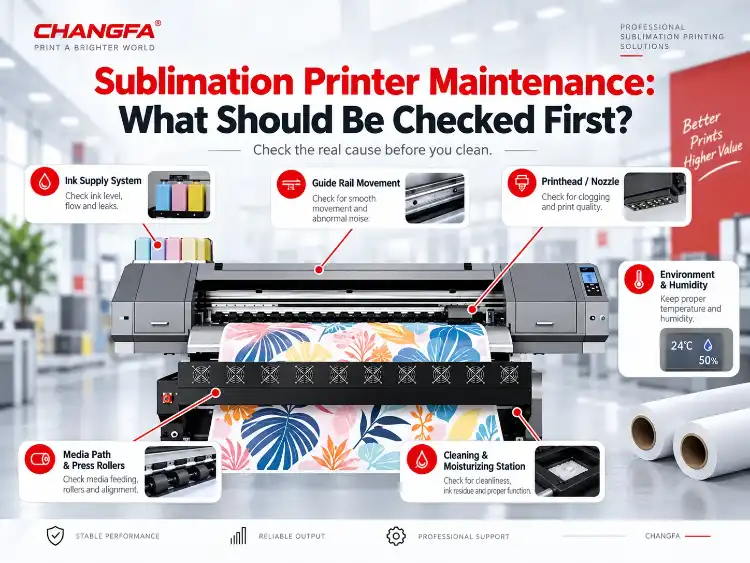
Sublimation printer maintenance should start with the actual printer architecture and production symptom, not with a generic cleaning calendar. On an industrial sublimation printer, printhead safety, continuous ink supply, ink-level alarms, the cleaning and moisturizing area, media-path rollers, guide-rail movement, job changes and the operating environment can all affect long-run output. The article frames maintenance as an evidence sequence: preserve the baseline, check the model-specific features and production variables that changed, verify nozzle and ink-supply stability, confirm paper-path and long-run behaviour, then decide whether cleaning, a consumable change, color management, ink-storage review or service support is justified. Changfa Digital’s CF-6000 and CF-8000 product information gives production teams a defined equipment reference instead of a universal maintenance timetable.
What Should Printers Check Before They Clean Anything?
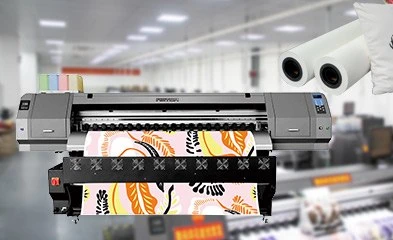
The first decision is not which cleaning cycle to run, but whether the team has enough evidence to choose one.
Start With the Last Known Good Nozzle Pattern and Production Sample
A saved nozzle pattern and an approved production sample give the team a reference point. Use the current defect as the comparison point before cleaning alters the printhead condition, ink flow or visible evidence.
Separate Printhead, Ink-Supply, Paper-Path and Environment Symptoms
Dropouts may point to ink delivery, while banding, paper marks, dust or color drift can start in different parts of the workflow. Classifying the symptom first prevents one cleaning action from being used for every production fault.
Confirm What Changed Before the Fault Appeared
Record any recent change to ink batch, paper roll, artwork, humidity, idle time or job length. The decision becomes more reliable when the timeline shows whether the fault followed a material change or developed during continuous production.
Record the Defect Before Cleaning Removes the Evidence
Photograph or describe the defect, nozzle pattern, run position and related settings before intervention. The record shows whether the problem returns after cleaning and whether the same condition appears at the start, middle or end of a run.
Which Printer Features Define the Maintenance Check?
The next maintenance step should match the printer model and its documented features rather than a generic checklist. A model-specific printer reference supports that comparison.
Confirm the Same Feature Exists Before Applying It to Another Printer Model
Do not apply every maintenance action from one printer to another model. CF-8000 has a separate product page with its own parameters, so its configuration should be checked separately. Verify the ink-supply, cleaning, printhead-protection and media-control features before using the same check.
Match the Maintenance Check to the Printer Model’s Ink-Supply Design
CF-6000 uses a secondary ink supply system adopted to keep printing for a long time and ensure the output quality of the picture. It also uses a two-stage continuous ink supply system, with four super-capacity ink cartridges and independent ink tubes for a row of nozzles. The maintenance check should therefore begin with the real ink path and supply condition rather than an assumed cleaning frequency.
Inspect Printhead Position and Media Clearance Before Cleaning
CF-6000 lists an anti-collision frame and adjustable nozzle position for different printing consumables. Anti-collision devices at both ends are intended to provide more comprehensive safety protection for the nozzle. When media or job conditions change, inspect clearance and positioning before deciding that the printhead itself needs aggressive cleaning.
Check the Ink Stack and Moisturizing Area Included in the Printer Design
An ink stack is equipped with an advanced intelligent nozzle cleaning and moisturizing device. The design is intended to make nozzle cleaning and maintenance safer and more convenient. These areas belong in the inspection sequence because their condition can affect nozzle stability, but the exact procedure and interval must follow the printer documentation.
Check Press Rollers for Static, Wrinkles and Print-Size Stability
An American fluorine rubber press roller is listed to prevent static electricity from flying and ink, make print size more accurate, and reject wrinkles. If marks, wrinkles or dimensional variation appear, check the media path and roller condition before changing ink or color settings.
Verify Guide-Rail Movement, Drive Stability and Length Accuracy
A Japanese THK silent linear guide rail is listed for more stable movement and longer service life. A two-way brushless motor with high-precision drive linear decoding is listed for higher precision, smaller length error, and more stable performance. Any unusual sound, vibration or repeated length variation should be recorded before parts are replaced.
How Should Common Symptoms Be Traced to the Right Maintenance Check?
Use the visible defect to choose the next check, then keep the investigation inside the affected system until the evidence changes.
Dropouts, Missing Nozzles and Repeated Cleaning
Begin with the nozzle pattern, ink level, supply path and recent idle time. Repeated cleaning without a stable pattern may indicate that the team is treating a supply or maintenance issue as a printhead-cleaning problem.
Banding, Uneven Density and Directional Print Errors
Banding can follow printhead condition, media movement, alignment or a change in production speed. Compare the pattern across the run and check the relevant model feature before changing a single setting.
Color Drift After Ink, Paper or Profile Changes
Color drift is not automatically an ICC problem. Hold the same ink, paper, fabric and transfer conditions during the comparison, then restore physical stability before treating color management as the cause.
Paper Marks, Edge Damage, Dust and Feeding Instability
Inspect the media path, roll condition, guides and dust sources when marks or edge damage appear. Sublimation paper and roll behaviour should be checked alongside printer settings because paper condition can change feeding and transfer results.
Excess Waste Ink or Unexpected Maintenance Consumption
Higher waste or cleaning consumption can reflect repeated cleaning, an unstable ink path or a changing production condition. Compare the trend with nozzle results, ink records and run length before assuming the printer needs a major service.
What Maintenance Signals Matter During Long Production Runs?
A short test can pass while the printer changes behaviour after several hours. Long-run records show whether the maintenance decision is stable enough for a production order.
Compare the Beginning, Middle and End of the Run
Inspect the same defect or print target at the start, middle and end of a representative run. A difference between those points is more useful than a single sample because it shows whether the process drifts over time.
Track Dropouts, Banding, Color Drift and Cleaning Frequency
Record each symptom with the run position and the action taken. Cleaning frequency becomes meaningful only when it is compared with output quality, ink consumption and the condition that triggered the cleaning.
Watch Ink Use, Waste and Maintenance Consumption
A change in ink use or waste can appear before the final print fails. Keep the observation tied to the ink path, maintenance actions and production volume so the team can distinguish normal variation from a developing problem.
Check Paper Dust, Edge Damage and Feeding Stability
Paper dust, damaged edges and unstable feeding can affect both print quality and maintenance load. Look at the roll, guides and media path together instead of treating every mark as a printhead defect.
Record the Run Length and Ink Load That Triggered the Problem
Write down the run length, ink load, fabric and environmental condition that produced the defect. These variables help the next test reproduce the issue and prevent a temporary improvement from being mistaken for a permanent fix.
When Does Maintenance Become a Color-Management Decision?
Color management belongs after the printer can produce a stable physical print. Otherwise, a profile may hide the real maintenance problem.
Restore Printhead and Ink-Delivery Stability Before Changing an ICC Profile
Confirm nozzle continuity, ink supply and media behaviour before changing the profile. A sublimation ICC profile cannot correct missing nozzles, an unstable ink path or an uncontrolled paper change.
Use Sublimation Color Management to Compare a Controlled Baseline
Keep artwork, RIP settings, paper, fabric and transfer conditions constant for the first comparison. Sublimation color management should describe a controlled process, not compensate for a printer that is still changing between runs.
Do Not Use an ICC Profile to Hide Missing Nozzles or an Unstable Ink Supply
A profile can improve a measured color target while leaving a mechanical defect in place. If the nozzle pattern or ink supply is unstable, stop the profile change and return to the physical maintenance sequence.
Recheck Color After Maintenance on the Actual Paper and Fabric
Approve the result after transfer on the actual production materials. The paper image alone does not show how the final fabric responds to heat, pressure and dye migration.
Keep Profile Changes Documented and Separated From Routine Cleaning
Record the profile, printer state, ink batch, paper and fabric used for approval. Separating profile decisions from routine cleaning prevents later teams from assuming that a color change was caused by the wrong maintenance action.
How Do Ink Storage and Shelf Life Affect Printer Maintenance?
Ink condition is part of the printer condition. Age, storage and stock rotation can change nozzle stability and color behaviour without creating a visible fault in the bottle or cartridge.
Track Ink Batch, Open Date and Stock Rotation
Record the ink batch and open date, then rotate stock before older material is placed into a long production run. Batch records make it easier to compare a maintenance event with the ink actually used at that time.
Follow Supplier Instructions Because Shelf Life Is Not Universal
Do not apply one shelf-life number to every sublimation ink or storage condition. The correct guidance depends on the specific product, packaging, environment and supplier instructions.
Protect Ink From Contamination, Extreme Conditions and Unsealed Storage
Keep containers closed and avoid contamination or extreme storage conditions. A clean ink path starts before the ink reaches the printer, and storage practice belongs in the same maintenance review.
Test Older or Long-Stored Ink Before a Production Run
Use a controlled test before committing older stock to a customer order. Compare nozzle stability, color behaviour and cleaning demand with the current production baseline rather than relying on appearance alone.
Connect Ink Condition to Nozzle Stability, Color and Cleaning Frequency
When a defect appears, compare the sublimation ink supply condition with the nozzle pattern and recent cleaning history. This keeps ink storage inside the maintenance decision instead of treating it as a separate purchasing issue.
What Records and Escalation Path Should Close the Maintenance Task?
The maintenance task is complete only when the team can describe what changed, what was tested and whether the print condition is stable enough for production.
Record the Printer Model, Printhead and Ink Series
Start the record with the exact printer model, printhead and ink series. This prevents a maintenance result from one configuration from being applied to a different printer without checking its own features and parameters.
Include Paper Type, GSM, Fabric and Run Length
Add the paper type and GSM, fabric and planned run length to the same record. These variables explain whether a defect belongs to the maintenance action or to a material condition that changed at the same time.
Add Humidity, Idle Time, Nozzle Pattern and Maintenance History
Humidity, idle time, nozzle results and previous cleaning or replacement actions give the next decision a timeline. A defect with no timeline is difficult to reproduce and easy to misdiagnose.
Confirm the Result With a Repeatable Test Print and Continuous Run
Use a repeatable test and a representative continuous run before closing the task. Verify that the original symptom does not return and that the result remains stable across the run.
Send the Production Evidence for a Specific CF-6000 or CF-8000 Review
If the issue remains model-specific, provide the printer, printhead, ink, paper, fabric, run condition and test output for a targeted review. The CF-8000 production printer is a separate model reference with its own parameters, not a copy of CF-6000 features.
Use the Model-Specific Parameter and Maintenance Information Supplied With the Printer
Follow the maintenance and parameter information supplied for the actual machine, then compare it with the observed production result. This keeps the final decision tied to the installed configuration rather than to a generic schedule.
Conclusion
Maintenance should be planned from the printer model, production symptom and actual run evidence, not from a universal daily, weekly or monthly cleaning calendar. Changfa Digital’s CF-6000 product information describes features such as a secondary ink-supply system, ink-level alarm, anti-collision frame, intelligent nozzle cleaning and moisturizing device, press rollers and guide-rail drive; these are the kinds of model-specific features that should determine what is checked and what is escalated. Keep the printer model, printhead, ink series and batch, paper, fabric, run length, environment and test output together, then send the production evidence for a specific CF-6000 or CF-8000 review so the maintenance point is tied to the actual machine configuration.
FAQs
Q1: How often should a sublimation printer be maintained?
A1: Maintenance frequency is not universal. It should follow the printer model documentation and observed production performance, adjusted for duty cycle, environment, ink system and job changes. Record when checks are performed and compare them with nozzle, ink-supply, paper-path and output results instead of copying a fixed cleaning calendar.
Q2: Should maintenance include a new ICC profile?
A2: Not as the first response. Printhead, ink-delivery and paper-path stability should be restored before color management is changed. A new ICC profile is appropriate only after the physical setup and process conditions are stable enough to produce a controlled baseline on the actual paper and fabric.
Q3: What records help with sublimation printer maintenance?
A3: Record the printer model, printhead, ink series, ink batch and open date, paper type and GSM, fabric, run length, humidity, idle time, nozzle pattern, cleaning actions, waste indicators and before-and-after test output. These records help separate a persistent printer issue from a material or process change.


