


HOT SALE
APPLICATION
Phone:+86-15215969856 E-Mail: 396838165@qq.com

For textile factories, upgrading to a high-speed sublimation printer is worth considering only when the current printer is already limiting confirmed orders, color repeatability, shift planning, or delivery capacity. A faster machine does not automatically solve production pressure. The real question is whether the wider print width, PASS speed, ink supply design, nozzle maintenance, drying match, and software workflow can support daily batch output without creating new bottlenecks.
That is why buyers should compare real production conditions before signing an equipment order. Changfa Digital lists several printer options for textile transfer workflows, including CF-3000, 6198-8, and CF-15000 models under its printer range. For a factory handling repeat polyester fabric orders, these models can be used as reference points when checking output width, PASS mode, ink continuity, operating environment, and maintenance needs.
When Does a Sublimation Printer Upgrade Start to Make Sense?
An upgrade usually becomes practical when the printer is no longer the only machine in a small sample corner. Once daily orders move from trial runs into repeat fabric batches, the printer starts to affect delivery promises, operator workload, color consistency, and waste control. At that point, the purchasing team should judge the sublimation printer upgrade as part of a production line, not as a single machine purchase.
Order Pressure Shows the First Warning
The first sign is not always obvious machine failure. It may be overtime, delayed rolls, unstable queue planning, or too many urgent jobs waiting for one printer. A factory may still finish orders, but the process feels tight every week. Operators keep changing files, cleaning heads, or waiting for the next roll. When this happens, the issue is no longer just speed on paper. It is whether the printer can hold a stable rhythm across repeated textile batch orders.
Manual Work Starts to Eat Capacity
A smaller machine can be acceptable for sampling, short promotional work, or low-volume custom orders. It becomes less comfortable when every shift depends on manual checking, frequent ink monitoring, and repeated pause-and-restart work. The solution is not simply to buy the largest model. Buyers should first list the real downtime points: file preparation, roll loading, ink checks, nozzle cleaning, drying, and transfer scheduling. The right high-speed sublimation printer should reduce the biggest bottleneck, not create a more expensive version of the same process.
What Printer Specifications Matter More Than Claimed Speed?
Machine speed numbers are useful, but they need context. A procurement team should ask how the number was measured, which PASS setting was used, what fabric and paper conditions were assumed, and whether the factory can keep the upstream and downstream process moving. This section matters because many buyers compare only maximum speed, then discover later that their normal production runs at a lower practical speed.
Print Width Affects Roll Planning
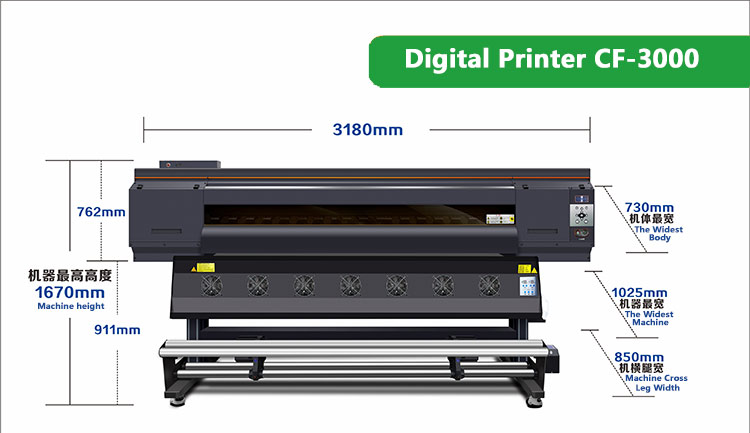
Print width decides how the machine fits current fabric orders, not just how large the printer looks. For example, CF-3000 is shown with a 1900mm print dimension, while 6198-8 is shown with a 1800mm maximum print width. CF-15000 is also listed with a 1900mm maximum print width. These figures help buyers match the printer with fabric roll width, common artwork layouts, and transfer paper stock. A wider machine may reduce re-layout work, but only when the buyer already has orders that can use that width.
For buyers comparing equipment options, the Changfa Printer category is the better starting point than judging one model in isolation. It allows the purchasing team to compare printer width, machine type, and application direction before narrowing the RFQ.
PASS Mode Changes Real Output
PASS mode is where many production estimates become too optimistic. CF-3000 is listed with 2PASS at 162 square meters per hour, 3PASS at 109 square meters per hour, and 4PASS at 82 square meters per hour. 6198-8 shows 1PASS at 200 square meters per hour and 2PASS at 110 square meters per hour, with lower speeds at higher PASS settings. CF-15000 shows 2PASS at 120 square meters per hour, 3PASS at 85 square meters per hour, 4PASS at 65 square meters per hour, and 6PASS at 45 square meters per hour. These numbers should be read as selection clues. The buyer still needs to confirm which PASS setting delivers acceptable detail, color density, and fabric result for the order type.
How Should Buyers Compare Printer Models for Batch Orders?
A high-speed printer is not chosen by the model name alone. The better approach is to compare each model against order structure: average run length, artwork complexity, repeat order frequency, roll width, operator skill, maintenance capacity, and available floor space. The following comparison helps turn machine specifications into purchasing questions.
|
Model |
Useful Buying Clue |
Where It May Fit |
What Buyers Should Confirm |
|
CF-3000 |
1900mm print dimension; 2PASS/3PASS/4PASS speed options |
Factories moving from normal runs to stronger batch output |
Which PASS setting gives acceptable color and detail for regular fabric orders |
|
6198-8 |
1800mm maximum print width; high listed speed at low PASS settings |
Plants comparing fast production for wider digital printing work |
Whether normal quality settings can still meet the planned delivery schedule |
|
CF-15000 |
1900mm maximum print width; multiple PASS settings up to 6PASS |
Buyers needing a digital fabric printer for steadier order planning |
Space, operator training, ink flow, and practical daily output under factory conditions |
Model Choice Should Follow Order Mix
If a buyer mainly prints short sample runs, a larger high-speed model may sit below its real capacity. If the factory prints long polyester fabric batches, repeated fashion orders, or sportswear fabric panels, a model such as CF-3000 may be worth comparing because the machine information points to 1900mm print dimension, CMYK ink, automatic cleaning and moisturizing, and continuous production features. The exact choice should still be checked against the buyer’s own roll width and artwork type.
Factory Conditions Decide Daily Stability
A printer that looks strong on paper may underperform if the workshop cannot maintain stable temperature, humidity, and operator routine. 6198-8 is listed with an operating environment of 20-30 degrees Celsius and humidity of 35%-65%. CF-3000 is listed with 18-30 degrees Celsius and humidity of 35%-65%. Buyers should compare those requirements with their actual workshop, especially in hot, damp, or dusty seasons. This is a practical check, not a small detail.
Why Do Ink Supply and Nozzle Maintenance Affect Upgrade Value?
Many factories think about printer speed first and maintenance second. In real production, that order should be reversed once the factory is running batch jobs. A faster printer that stops often for cleaning, ink checks, or nozzle recovery will not deliver the expected output. The upgrade value depends on whether daily operators can keep the machine running without constant emergency handling.
Ink Continuity Protects Shift Planning
For repeated orders, ink interruption does more than slow one job. It affects color continuity, roll planning, and sometimes transfer scheduling. CF-3000 product information describes four large-capacity ink cartridges that independently and continuously supply ink, along with an intelligent lack-of-ink alarm. For a factory running long fabric rolls, this kind of feature is useful because the operator does not need to rely only on manual checking. Buyers should still ask how ink refill, filtration, and alarm response work during normal shifts.
Nozzle Care Reduces Hidden Downtime
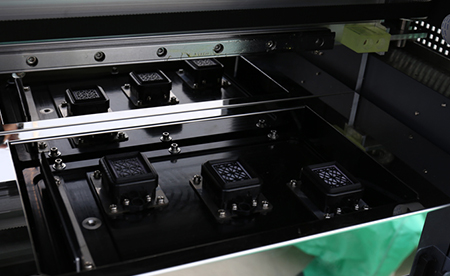
Nozzle maintenance is easy to underestimate during purchasing. A clogged or unstable head can turn a fast printer into a slow line very quickly. CF-3000 is described with intelligent nozzle cleaning and moisturizing functions. For a production team, the buying question is simple: does the machine make routine care easier for operators, or does it require highly skilled troubleshooting every time the line pauses? A sublimation printer upgrade is more valuable when maintenance is predictable.
How Does Software and Workflow Fit Into Printer Upgrading?
A high-speed printer cannot fix a slow file and approval process by itself. Buyers should check how artwork moves from order confirmation to RIP software, printer output, drying, transfer, inspection, and packing. If files arrive late, color references are unclear, or sample approval is poorly recorded, the new printer may simply reach the same problem faster.
RIP Compatibility Needs Early Confirmation
CF-3000 product information lists support for Maintop6.1, PhotoPrint, ONYX, NeoStampa, and other software, with standard Maintop6.1. That is useful, but buyers still need to confirm their own workflow. Does the team already use one of these tools? Are the operators trained? Can repeat jobs be stored and recalled cleanly? The purchasing team should include software, color profile handling, and file format checks in the RFQ, not wait until installation.
Downstream Capacity Must Match Printer Output
If printing capacity increases but heat transfer capacity stays the same, work-in-process piles up between printing and transfer. This is common in factories that upgrade one machine without reviewing the whole line. Buyers should compare printer output with drying, roll storage, transfer machine width, operator availability, and inspection space. If the downstream line cannot keep up, the new digital fabric printer may improve one step while exposing the next bottleneck.
For factories comparing a broader production upgrade, CF-15000 can be reviewed as another digital fabric printer option, especially where 1900mm maximum print width and multiple PASS settings are part of the order discussion. Buyers should confirm the final model choice by sample test, factory layout, and expected order mix.
What Should Buyers Confirm Before Sending an RFQ?
A good RFQ should not simply ask for a machine quotation. It should give the supplier enough information to judge whether the model fits the buyer’s production goal. This also helps avoid later disputes about speed, color result, media compatibility, and delivery expectations.
Share Real Production Data
Buyers should prepare average roll width, daily target output, fabric type, transfer paper type, common image coverage, preferred PASS setting if known, workshop temperature and humidity, available power supply, and current bottlenecks. This information makes the supplier response more useful. It also prevents a common problem: a machine is selected from a catalog number, while the actual factory condition points to a different model or supporting process.
Ask for Samples and Support Details
Before a batch order upgrade, sample testing matters. Buyers should ask what sample files, paper, ink, transfer conditions, and fabric references are needed. They should also confirm installation guidance, operator training, spare parts, and response route. If the factory is already losing time from slow output or unstable maintenance, this is the stage where a more controlled supplier discussion matters. The next step is to contact Changfa Digital with real order details rather than only asking for a basic catalog quotation.
Conclusion
A high-speed sublimation printer can be worth upgrading for textile batch orders, but only when the upgrade is tied to real production pressure. Buyers should look beyond headline speed and compare print width, PASS mode, operating environment, ink supply, nozzle care, software compatibility, and downstream transfer capacity. CF-3000, 6198-8, and CF-15000 give buyers several printer directions to compare, but the final decision should come from order mix, sample testing, operator capacity, and workshop conditions. If your factory is already dealing with late batches, overtime, or unstable repeat output, the better move is not guessing from a catalog. It is sending a clear RFQ and matching the printer to the full textile printing line.
FAQs
Q1: Is a high-speed sublimation printer always better for batch orders?
A1: No. We suggest checking order volume, fabric width, PASS setting, operator skill, and transfer capacity before upgrading.
Q2: What details should buyers send before asking for a printer recommendation?
A2: Buyers should share roll width, fabric type, daily output target, current machine limits, workshop conditions, and sample requirements.
Q3: Can Changfa Digital help compare different printer models?
A3: Yes. We can discuss CF-3000, 6198-8, CF-15000, and related printer options based on actual order needs.


