


How Should Print Shops Evaluate a Multi-Head Digital Fabric Printer Before Scaling Production?
APPLICATION
Phone:+86-15215969856 E-Mail: 396838165@qq.com

Print shops moving from sampling to bulk orders often discover that a digital fabric printer is not judged by speed alone. A sample can pass under calm conditions, then the same line may struggle when the order mix changes, fabric width increases, or operators need to keep the printer running through a full shift. Before a print shop approves a multi-head digital fabric printer, the buying team should look at printhead configuration, real pass-mode output, feeding behavior, drying load, and maintenance downtime together. For buyers comparing printer options, Changfa Digital lists models such as CF-15000 and Model-xplus-8 with 1900mm print width, CMYK ink, 300DPI physical printing, and several pass-mode speed figures. Those numbers are useful, but they still need to be tested against the shop’s own fabrics and daily jobs.
Why Does Scaling From Sampling to Bulk Printing Change the Buying Question?
Scaling production changes the risk. A printer that looks fast during a demo may still create delays if the daily order mix includes heavier rolls, wider fabrics, dark artwork, frequent color changes, and short deadlines. The buying question moves from “Can it print?” to “Can it run the same jobs every day with fewer surprises?”
Compare Sample Approval With Daily Order Mix
Sample approval is usually a clean test. The artwork is chosen, the operator has time, and the run is short. Bulk production is different. A shop may print sportswear panels in the morning, home textile fabric after lunch, and repeated small batches before the shift ends. A multi-head digital fabric printer should be evaluated with that real mix, not only with a single sample file.
Buyers should bring current rework causes into the discussion. If most reprints come from skew, drying marks, banding, color drift, or handling damage, a faster fabric printing machine may not remove the bottleneck. The better test is to run the fabrics and patterns that already create pressure in the shop.
Separate Speed Problems From Stability Problems
Some print shops think they have a speed problem because orders are late. After checking the line, the real issue may be stoppages, cleaning, roll changeover, or slow drying. A fabric printing machine with stronger speed data can still leave the team waiting if feeding and maintenance are not stable.
Before scaling, the team should map one normal production day. Note how many meters are printed, how many stops happen, how long operators spend checking nozzles, and how often finished fabric needs rework. This turns the digital fabric printer purchase into a production-control decision rather than a simple equipment upgrade.
What Should Buyers Check in Printhead Configuration?
Printhead configuration affects output, spare parts, service planning, and color control. The product name may suggest a higher-capacity line, but buyers still need written confirmation of the head count, head model, ink channels, and service scope before they treat the machine as ready for bulk orders.
Confirm Head Count, Head Model, and Ink Channels
A multi-head digital fabric printer should not be judged by the word “multi-head” alone. Ask the supplier to confirm the exact head count, printhead model, ink channel arrangement, and spare-part lead time. If the shop runs CMYK only, the team should still check whether the configuration matches future color plans, ink availability, and maintenance skills.
For Changfa product comparison, buyers can review the CF-15000 digital fabric printer as one 1900mm option. For buyer screening, the confirmed product data includes Inkjet Printer type, Textile usage, 1900mm Print Dimension and Max Print Width, CMYK ink, and 300DPI physical printing. Those items are strong starting points, while the final printhead configuration should still be checked before an order is placed.
Test 300DPI, CMYK, and Pass Mode Speeds
The pass-mode figures give buyers a useful baseline: 2PASS at 120 sq m/h, 3PASS at 85 sq m/h, 4PASS at 65 sq m/h, and 6PASS at 45 sq m/h. The practical question is which pass mode produces acceptable quality for the shop’s normal artwork. A fine pattern, dense coverage, or strict brand color may need a slower mode than a simple layout.
A careful buyer should test 300DPI, CMYK, and 2PASS, 3PASS, 4PASS, and 6PASS output with real artwork. Do not rely on a single speed claim. Ask for sample files, production logs, and a short explanation of how the supplier defines each speed figure. This keeps the printhead configuration discussion tied to real output.
|
Checkpoint |
Why It Matters |
What Buyers Should Ask For |
|
Printhead configuration |
Affects service planning, spare parts, and real line output. |
Head count, head model, ink channels, lead time, and service scope. |
|
Pass-mode output |
One headline speed cannot describe every job file. |
2PASS, 3PASS, 4PASS, and 6PASS tests with real artwork. |
|
Fabric feeding |
Skew, tension, and rewind issues create rework during batch textile printing. |
A 1900mm trial using the fabric widths and rolls used in production. |
|
Operating environment |
Temperature and humidity can change ink behavior and downtime risk. |
Room condition targets, cleaning routine, and support response path. |
How Should Speed Claims Be Tested Against Fabric Feeding?
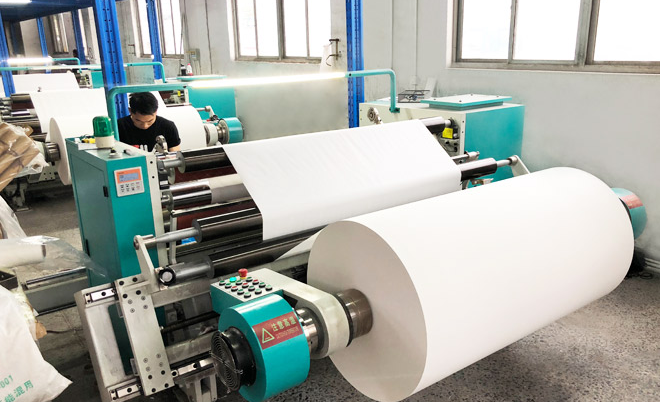
A speed figure only matters when fabric moves cleanly through the line. During batch textile printing, fabric feeding, roll tension, skew control, drying, and rewind quality can decide whether the shift ends with usable fabric or a pile of rework. Buyers should watch the full path, not only the printed image.
Measure Output by Fabric Type and Shift Length
A 1900mm printer trial should use fabric close to the shop’s real production. Lightweight polyester, thicker home textile fabric, and stretch fabric may behave differently under the same speed setting. Pattern coverage also matters. A light repeat print and a dark all-over design can create different drying loads and operator decisions.
The team should measure output across a practical shift length. A short demo may run smoothly for 20 minutes, but a bulk order exposes roll changes, operator breaks, cleaning pauses, and drying limits. For batch textile printing, the useful number is not the best minute of the test; it is the stable output after normal interruptions.
Watch Feeding, Tension, Drying, and Rewind Results
During the trial, watch the fabric before and after printing. Look for skew, tension marks, edge movement, wrinkling, uneven drying, and rewind looseness. These signs are easy to miss if the buyer only checks color on a small sample. Feeding stability can decide whether the fabric printing machine fits real production.
Drying should also be checked under the same ink load and room conditions expected in the shop. If printed fabric cannot be handled, stacked, or rewound safely at the claimed speed, the line may need a slower mode. That is not a failure of the digital fabric printer; it is a sign that the speed test must include drying and handling.
How Does Maintenance Downtime Change Upgrade ROI?
Maintenance downtime can turn a good speed figure into a poor upgrade. Buyers should ask how the model handles nozzle checks, cleaning, capping, ink alarms, drying parts, and operator access. If a feature is not confirmed for the exact model under review, keep it as a confirmation point instead of assuming it is included.
Verify Maintenance Steps by Model
Ask the supplier to show the exact maintenance routine for the model under review. How often should nozzles be checked? What happens during a longer stop? Which parts are consumables? How quickly can spare parts be shipped? These details affect production more than a brochure speed line.
For service planning, Changfa supports target printer discussions with online support, free spare parts, video technical support, and a 3-year warranty. Buyers can also review the company’s 24-Hour Professional Service information when planning support questions. The practical step is to connect those support items with the print shop’s working hours, operator skill level, and spare-part plan.
Review Downtime Logs Before Purchase
If the shop already uses another digital fabric printer, review the last few months of downtime. Separate cleaning time, nozzle issues, fabric feeding stops, drying delays, and operator changeover. This history helps the buyer ask sharper questions about a new multi-head digital fabric printer.
For a new shop, ask the supplier for recommended daily, weekly, and long-stop maintenance steps. The answer should be clear enough for operators to follow. If the line stops often during a trial, record what happened and how long recovery took. The true ROI is shaped by uptime, not only by pass-mode output.
How Can Changfa Digital Fabric Printer Options Fit Different Upgrade Plans?
Changfa printer options can support different upgrade discussions, but the buyer should match each model to verified data and real production needs. CF-15000 and Model-xplus-8 can both be reviewed as 1900mm digital fabric printer options. The final choice should come after test files, fabric trials, and configuration confirmation.
Evaluate CF-15000 Production Width and Speed
CF-15000 is useful when the buyer wants to evaluate a 1900mm production-width route. The confirmed data gives a clear base for inquiry: CMYK ink, 300DPI physical printing, and pass-mode speeds from 2PASS to 6PASS. The next step is not to accept the fastest figure as daily capacity, but to test the speed against fabric type, artwork, drying, and operator changeover.
A buyer comparing this option should prepare three or four real job files before talking with the supplier. Include a dense design, a normal repeat pattern, and a file that previously caused rework. This makes the fabric printing machine discussion more useful than a general product comparison.
Confirm Model Xplus 8 Configuration Before Upgrade
For another upgrade route, buyers can compare Model-xplus-8 digital fabric printer with the same 1900mm, CMYK, 300DPI, and pass-mode framework. Because the final head arrangement and model-specific maintenance details should be confirmed with Changfa, treat it as a structured comparison rather than a guessed specification.
The broader Premium Sublimation Paper Printers category can help buyers see related printer options before narrowing the shortlist. For print shops scaling production, the best choice is usually the model that fits current bottlenecks, not the one with the most attractive single number.
Conclusion
A multi-head digital fabric printer upgrade should be approved as a production-control decision, not only a speed upgrade. Buyers should compare confirmed 1900mm print width, CMYK, 300DPI, and pass-mode output with fabric feeding behavior, drying capacity, nozzle maintenance steps, operating environment, support scope, and downtime records. CF-15000 and Model-xplus-8 can be reviewed with real job files and current rework data. When the team is ready to compare models, it can Contact Us with fabric type, target speed, print width, sample-to-bulk workflow, and maintenance concerns.
FAQs
Q1: What should a print shop test before buying a multi-head digital fabric printer?
A1: Test real artwork, fabric width, pass-mode speed, feeding stability, drying load, operator changeover, and maintenance steps. A demo file is useful, but a production file shows whether the printer fits daily work.
Q2: Why is printhead configuration important in textile printing?
A2: Printhead configuration affects output, ink channel planning, spare parts, service response, and maintenance skill. Buyers should confirm head count, head model, ink channels, and service scope before scaling production.
Q3: Can pass-mode speed be treated as guaranteed daily output?
A3: No. 2PASS, 3PASS, 4PASS, and 6PASS speeds are helpful reference points, but real output depends on fabric type, artwork coverage, drying, cleaning, room conditions, and operator workflow.


