


Máy in kỹ thuật số cho vải polyester: Những điều người mua nên so sánh trước khi nhập khẩu
Bán nóng
Ứng dụng
Phone:+86-15215969856 E-Mail: 396838165@qq.com

Khi nhập khẩu máy in dệt, báo giá thường là phần dễ so sánh nhất. Những câu hỏi khó hơn sẽ đến sau: Máy có vừa qua cửa xưởng không? Thiết bị truyền nhiệt hiện có có đáp ứng được không? Tốc độ được báo giá có phản ánh chất lượng in ấn cần thiết cho các đơn hàng hàng ngày không? Điều gì xảy ra khi đầu in, cảnh báo mực, máy sấy hoặc quy trình RIP cần được bảo trì?
Vì vậy, việc lựa chọn máy in kỹ thuật số cho vải polyester không chỉ đơn thuần là tìm kiếm thông số kỹ thuật cao nhất mà quan trọng hơn là phải phù hợp máy in với dây chuyền sản xuất xung quanh.
Đối với quần áo thể thao bằng polyester, vải thời trang, hàng dệt gia dụng, cờ và các sản phẩm in cuộn khác, người mua cần so sánh khổ in, tốc độ in, cấu hình đầu in, quy trình làm việc với giấy và mực, điều kiện lắp đặt và hỗ trợ kỹ thuật trước khi máy rời khỏi nhà cung cấp. Một vài bước kiểm tra trước khi giao hàng sẽ tiết kiệm chi phí hơn nhiều so với việc phải thiết kế lại xưởng sản xuất cho phù hợp với máy in không phù hợp.
Máy in sẽ thực sự cần xử lý những công việc sản xuất nào?
Hãy bắt đầu với những đơn đặt hàng đã được nhà máy thực hiện, chứ không phải với danh mục in ấn.
Một công ty in ấn các sản phẩm thời trang số lượng nhỏ có thể coi trọng tính linh hoạt và chi phí vận hành dễ quản lý. Một nhà máy sản xuất quần áo thể thao hoặc biển hiệu mềm theo đơn đặt hàng lặp lại có thể quan tâm hơn đến sản lượng liên tục và ít lần dừng máy. Một nhà phân phối có thể cần một máy móc có thể phục vụ nhiều đối tượng khách hàng khác nhau thay vì chỉ một ứng dụng rất hẹp.
Hãy ghi ba con số cụ thể lên giấy trước khi so sánh các loại máy:
- Sản lượng bình thường hàng ngày, không phải là sản lượng cao nhất theo lý thuyết;
- Loại vải hoặc kiểu bố trí rộng nhất được sản xuất thường xuyên;
- Tỷ lệ giữa các công việc ngắn hạn và các công việc dài hạn liên tục.
Những con số này cung cấp bối cảnh cho mọi thông số kỹ thuật tiếp theo. Nếu không có chúng, máy in thăng hoa công nghiệp có thể dễ dàng bị quá khổ ở một khía cạnh nào đó và vẫn trở thành điểm nghẽn ở khía cạnh khác.
Một danh sách rút gọn hữu ích cũng cần xem xét đến sự tăng trưởng. Nếu sản lượng gần đạt đến giới hạn của dây chuyền hiện tại, hãy để lại một khoảng dự phòng. Nếu nhu cầu không ổn định, việc trả tiền cho công suất hoạt động mà hầu hết thời gian trong tháng đều không mang lại hiệu quả kinh tế tốt hơn.
Thông số kỹ thuật nào tiết lộ nhiều thông tin hơn tốc độ tối đa?
Nhà máy thực sự sẽ sử dụng khổ in rộng bao nhiêu?
Chiều rộng bản in phải tuân theo kích thước cuộn vải, giấy chuyển nhiệt, bố cục và thiết bị chuyển nhiệt.
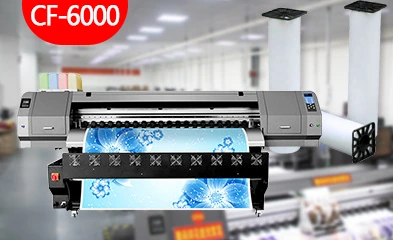
Changfa Digital có một số máy móc thuộc dòng máy dệt khổ rộng. Máy in kỹ thuật số CF-2000 có chiều rộng in tối đa được ghi trong thông số kỹ thuật là 1900 mm. Máy in vải polyester CF-6000 Ngoài ra, tài liệu này cũng ghi rõ chiều rộng in tối đa là 1900 mm.
Chiều rộng đó có thể hữu ích cho việc gia công vải khổ lớn, nhưng chỉ riêng chiều rộng không làm tăng năng suất. Nếu máy chuyển vải hẹp hơn, hoặc hầu hết các đơn đặt hàng sử dụng cuộn vải hẹp hơn đáng kể, thì một phần công suất đó sẽ không được sử dụng.
Đối với máy in chuyển nhiệt khổ rộng, hãy kiểm tra toàn bộ chiều rộng của dây chuyền sản xuất:
Máy in → Giấy chuyển nhiệt → Máy ép nhiệt → Cuộn vải → Sơ đồ cắt.
Chỉ cần một sự không phù hợp cũng có thể làm mất đi lợi thế của cỗ máy rộng hơn.
Tại sao cần so sánh tốc độ in PASS với chất lượng in yêu cầu?
Thông số tốc độ mà không có chế độ PASS thì không nói lên nhiều điều.
Máy CF-2000 có thông số kỹ thuật là 105 m²/h ở chế độ 2 lượt, 70 m²/h ở chế độ 3 lượt, 55 m²/h ở chế độ 4 lượt và 35 m²/h ở chế độ 6 lượt. Máy CF-6000 có thông số kỹ thuật là 200 m²/h ở chế độ 1 lượt, 110 m²/h ở chế độ 2 lượt và 75 m²/h ở chế độ 3 lượt. Máy CF-8000 có thông số kỹ thuật là 120 m²/h ở chế độ 2 lượt, 85 m²/h ở chế độ 3 lượt, 65 m²/h ở chế độ 4 lượt và 45 m²/h ở chế độ 6 lượt.
Những con số đó sẽ hữu ích hơn nhiều khi được gắn liền với một công việc thực tế.
Người mua in các khối màu đơn sắc cho cờ có thể đưa ra quyết định về chất lượng khác với một nhà máy sản xuất các hình ảnh đồ họa thời trang chi tiết. Hãy yêu cầu bản in thử ở chế độ PASS mà nhà máy dự kiến sử dụng thường xuyên nhất. Sau đó, tính toán năng lực sản xuất dựa trên con số đó thay vì chế độ nhanh nhất được quảng cáo.
|
Người mẫu |
Chiều rộng in tối đa |
Tốc độ được liệt kê đã chọn |
So sánh hữu ích |
|
CF-2000 |
1900 mm |
2 lượt: 105 m²/giờ; 4 lượt: 55 m²/giờ |
Năng suất vừa phải và công việc đa PASS |
|
CF-6000 |
1900 mm |
1 lượt: 200 m²/giờ; 2 lượt: 110 m²/giờ |
In ấn polyester năng suất cao |
|
CF-8000 |
1900 mm |
2 lượt: 120 m²/giờ; 4 lượt: 65 m²/giờ |
Sản xuất dệt tốc độ cao |
Thiết kế đầu phun và hệ thống mực in quan trọng đến mức nào?
Tại sao số lượng đầu in chỉ là một phần của câu chuyện?
Việc tăng số lượng đầu in có thể làm tăng sản lượng tiềm năng, nhưng đó không phải là toàn bộ yếu tố quyết định.
Máy in CF-2000 sử dụng hai đầu in Epson I3200-A1. Các chức năng của đầu in bao gồm làm sạch tự động và phun dưỡng ẩm tự động. Máy in CF-6000 sử dụng sáu đầu in Epson 5113 và cũng bao gồm các chức năng làm sạch và dưỡng ẩm tự động.
Đối với máy in dệt kỹ thuật số nhập khẩu, các vấn đề thực tiễn đặt ra rộng hơn:
- Máy in được báo giá sử dụng loại đầu in nào?
- Cấu hình này sử dụng bao nhiêu đầu đọc/ghi?
- Việc làm sạch và dưỡng ẩm được thực hiện như thế nào?
- Đầu thay thế và các bộ phận liên quan có dễ tìm mua không?
- Các nhân viên vận hành cần thực hiện những công việc bảo trì hàng ngày nào?
Một máy in hoạt động nhanh trong buổi trình diễn nhưng lại cần can thiệp thường xuyên trên dây chuyền sản xuất có thể không đạt được sản lượng hàng tháng như mong đợi.
Hệ thống mực in có hỗ trợ được các chu kỳ sản xuất dài không?
Việc cung cấp mực in trở nên quan trọng khi máy in chuyển từ in mẫu sang in cuộn mực đầy đủ.
Máy in CF-2000 sử dụng bốn hộp mực 3 lít với hệ thống cấp mực liên tục độc lập. Máy cũng bao gồm chức năng cảnh báo hết mực, lọc mực, làm sạch vòi phun và máy sấy tích hợp gia nhiệt bằng khí bên ngoài. Máy in CF-6000 sử dụng hệ thống cấp mực liên tục hai giai đoạn và bốn hộp mực dung tích lớn, cùng với chức năng cảnh báo hết mực và làm sạch.
Những tính năng này rất hữu ích trong các nhà máy, nơi việc dừng lại giữa chừng một công việc dài đồng nghĩa với việc lãng phí thời gian, giấy tờ và khả năng lập kế hoạch.
Tuy nhiên, phần cứng máy in và mực in không thể tách rời. Máy in thăng hoa cho vải polyester cần sự kết hợp ổn định giữa mực in thăng hoa, giấy chuyển nhiệt, hiệu suất sấy khô, cài đặt RIP và khả năng truyền nhiệt. Trước khi nhập khẩu, hãy thử nghiệm máy với các vật liệu gần giống với vật liệu được sử dụng trong sản xuất thông thường.
Máy in này có phù hợp với quy trình in chuyển nhiệt hiện có không?
Máy in chỉ là khâu hoạt động đầu tiên của dây chuyền.
Sau khi hình ảnh được in ra từ máy in kỹ thuật số trên vải polyester, giấy vẫn cần phải khô, giữ ổn định trong quá trình in, chuyển sang giai đoạn truyền nhiệt, và phải phù hợp với chiều rộng vải và tốc độ truyền nhiệt.
Nếu máy in hoạt động nhanh hơn tốc độ chuyển giao, kiểm tra, cắt hoặc hoàn thiện của các công đoạn tiếp theo, tốc độ vượt trội đó có thể chỉ tạo ra sự tắc nghẽn.
Điều này đặc biệt quan trọng khi thay thế máy in dệt kỹ thuật số cỡ nhỏ bằng một mẫu máy nhanh hơn. Kế hoạch sản xuất cần so sánh:
- Kết quả in của máy in ở chế độ PASS như dự định;
- Quá trình sấy và thu giấy;
- Chiều rộng và tốc độ hoạt động của máy truyền nhiệt;
- Năng lực của người vận hành;
- Khả năng kiểm tra và hoàn thiện.
Việc nâng cấp thiết bị tốt nhất sẽ loại bỏ một hạn chế thực sự. Nó không nên chỉ chuyển hạn chế đó đi thêm hai bước nữa.
Changfa Digital cũng cung cấp giấy in chuyển nhiệt, mực in chuyển nhiệt, thiết bị truyền nhiệt và giấy lụa bảo vệ bên cạnh dòng máy in của mình. Phạm vi sản phẩm rộng hơn này giúp dễ dàng thảo luận về máy in như một phần của quy trình truyền nhiệt hoàn chỉnh hơn là một thiết bị riêng lẻ.
Xưởng đã sẵn sàng trước khi máy móc được vận chuyển chưa?
Đây là lúc việc lựa chọn thiết bị trở nên mang tính thực tiễn.
Người mua có thể dành nhiều tuần để so sánh chất lượng in mà quên kiểm tra cửa ra vào, không gian dỡ hàng, nguồn điện, khoảng cách an toàn với máy móc, hoặc khu vực cần thiết để chất và thu gom cuộn giấy.
Kích thước máy móc cho nhà nhập khẩu biết điều gì?
CF-2000 có kích thước vật lý được ghi trong thông số kỹ thuật là 2895 × 840 × 1490 mm. Kích thước đóng gói là 3020 × 940 × 1000 mm, với trọng lượng tịnh được ghi trong thông số kỹ thuật là 289 kg và trọng lượng cả bao bì là 400 kg.
Những con số đó rất quan trọng trước khi hàng đến. Chúng ảnh hưởng đến việc dỡ hàng, vận chuyển nội bộ, lối vào, bố trí mặt bằng và kế hoạch lắp đặt.
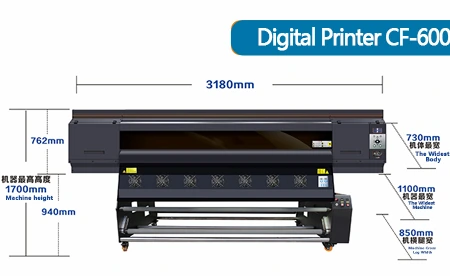
Máy in CF-6000 có kích thước vật lý được ghi trong thông số kỹ thuật là 3180 × 1700 × 1500 mm. Một nhà máy đang chuyển từ máy in nhỏ hơn cần đo khoảng cách thực tế từ điểm dỡ hàng đến vị trí lắp đặt cuối cùng, chứ không chỉ là khoảng trống nơi máy in sẽ được đặt sau này.
Cần kiểm tra những yêu cầu nào về điện và máy tính?
Việc chuẩn bị phần mềm và điện tử đều cần được chú trọng như nhau.
Máy in CF-2000 yêu cầu điện áp đầu vào 210–230 VAC, 50/60 Hz, 10 A, công suất hệ thống in 750 W và công suất máy sấy lên đến 3600 W. Các phần mềm RIP được hỗ trợ bao gồm Maintop 6.1, PhotoPrint, ONYX và NeoStampa.
Máy CF-6000 cũng có thông số điện áp đầu vào 210–230 VAC, 50/60 Hz, 10 A, hệ thống in 1000 W và công suất sấy lên đến 3000 W. Máy hỗ trợ các tùy chọn phần mềm RIP tương tự như đã nêu.
Đây là những tài liệu tham khảo hữu ích cho việc lập kế hoạch, nhưng nhà nhập khẩu nên xác nhận lại cấu hình điện của máy móc cụ thể trước khi vận chuyển. Các tiêu chuẩn phích cắm, bảng phân phối điện, thiết lập máy tính, kết nối mạng và công suất điện của xưởng sẽ dễ giải quyết hơn nhiều trước khi đội lắp đặt đến bên cạnh máy.
Cần xác minh những gì trước khi hoàn tất đơn đặt hàng nhập khẩu?
Đơn đặt hàng máy in thăng hoa công nghiệp cần nhiều chi tiết hơn là chỉ tên model.
Trước khi thanh toán cuối cùng hoặc xuất hàng, hãy đối chiếu các chứng từ thương mại với chính xác máy móc được cung cấp.
Kiểm tra:
- mẫu mã và cấu hình chính xác;
- Loại và số hiệu đầu in;
- chiều rộng in;
- Kết quả kiểm tra chế độ PASS đã được thống nhất;
- Thông số kỹ thuật nguồn điện;
- Kích thước máy móc và bao bì;
- phụ kiện tiêu chuẩn;
- Phần mềm RIP được cung cấp;
- Danh sách phụ tùng thay thế;
- Điều khoản bảo hành và hỗ trợ kỹ thuật;
- Các giấy tờ cần thiết theo yêu cầu của thị trường đích đến.
Không nên cho rằng giấy chứng nhận, điều khoản bảo hành hoặc phụ kiện được hiển thị cho một mẫu máy cụ thể sẽ tự động áp dụng cho mọi máy trong cùng dòng sản phẩm.
Ví dụ: Máy in dệt tốc độ cao CF-8000 Sản phẩm được chứng nhận bởi SGS, bảo hành ba năm, hỗ trợ trực tuyến, hỗ trợ kỹ thuật qua video và hỗ trợ phụ tùng thay thế. Những điều này có thể có giá trị đối với người mua ở nước ngoài, nhưng phạm vi cụ thể của chúng vẫn cần được ghi rõ trong thỏa thuận thương mại cho máy móc được mua bán.
Làm thế nào để người mua đưa ra lựa chọn máy in cuối cùng một cách tự tin hơn?
Đừng kết thúc việc so sánh chỉ bằng một cuốn brochure. Hãy kết thúc bằng một bài kiểm tra thực tế sản xuất.
Gửi một file thiết kế mẫu, giải thích về chất liệu vải và giấy chuyển nhiệt, và yêu cầu nhà cung cấp chạy thử ở chế độ chất lượng dành cho sản xuất hàng ngày. Kiểm tra chất lượng in, tốc độ, khả năng xử lý vật liệu, quá trình sấy khô và các bước cần thiết để lặp lại công việc.
Sau đó, hãy đặt câu hỏi cuối cùng: nếu máy móc này đến vào tháng tới, liệu nhà máy có thể lắp đặt nó và bắt đầu sản xuất theo đơn hàng bình thường mà không cần thiết kế lại toàn bộ dây chuyền sản xuất hay không?
Nếu câu trả lời là có, thì thông số kỹ thuật đó có lẽ liên quan đến nhu cầu sản xuất thực tế hơn là một con số hấp dẫn.
Dòng máy in của Changfa Digital bao gồm các mẫu CF-2000, CF-3000, CF-6000, CF-8000, 5198-8, 6198-8, Model-xplus-8 và CF-15000, cung cấp cho các doanh nghiệp dệt may nhiều mức công suất và cấu hình để so sánh. Người mua đã biết khổ vải, sản lượng mong muốn và thiết lập truyền tải hiện tại có thể Thảo luận kế hoạch sản xuất với Changfa Digital trước khi thu hẹp danh sách ứng viên.
Kết luận
Việc nhập khẩu máy in kỹ thuật số dành cho vải polyester sẽ hiệu quả nhất khi máy được đánh giá như một phần của toàn bộ dây chuyền sản xuất.
Chiều rộng bản in phải phù hợp với loại giấy, chất liệu vải và thiết bị truyền nhiệt. Tốc độ in (PASS speed) cần được so sánh ở mức chất lượng thực tế được sử dụng cho các đơn đặt hàng. Đầu in, hệ thống cấp mực, hệ thống sấy, phần mềm RIP, nguồn điện, khả năng tiếp cận xưởng và hỗ trợ sau bán hàng đều ảnh hưởng đến việc máy có hoạt động như mong đợi sau khi lắp đặt hay không.
Một máy in chuyển nhiệt khổ rộng với tốc độ in ấn ấn tượng vẫn có thể là khoản đầu tư sai lầm nếu dây chuyền sản xuất tiếp theo không thể tận dụng hết công suất đó. Ngược lại, một máy in chuyển nhiệt phù hợp với vải polyester có thể loại bỏ điểm nghẽn hiện có và tạo điều kiện thuận lợi cho nhà máy phát triển.
Quyết định mua hàng tốt nhất đến từ việc biến mỗi thông số kỹ thuật thành một câu hỏi thực tiễn về sản xuất hàng ngày trước khi máy móc được vận chuyển.
Câu hỏi thường gặp
Câu 1: Tôi nên so sánh những gì đầu tiên khi chọn máy in kỹ thuật số cho vải polyester?
A1: Bắt đầu bằng việc xác định yêu cầu sản xuất: khổ vải thông thường, sản lượng hàng ngày thực tế, loại đơn hàng phổ biến và công suất của dây chuyền in chuyển nhiệt hiện có. Sau đó, so sánh khổ máy in, tốc độ chế độ PASS, cấu hình đầu in, hệ thống mực và nhu cầu lắp đặt với các số liệu đó.
Câu 2: Liệu máy in thăng hoa công nghiệp nhanh nhất luôn là lựa chọn tốt nhất?
A2: Không. Tốc độ tối đa có thể được đo ở cài đặt PASS khác với cài đặt cần thiết cho các đơn hàng thông thường. Hãy so sánh các máy ở chất lượng in mà nhà máy thực sự sẽ sử dụng, sau đó kiểm tra xem quá trình sấy khô, truyền nhiệt, hoàn thiện và người vận hành có thể đáp ứng được sản lượng đó hay không.
Câu 3: Nhà nhập khẩu cần xác nhận những gì trước khi máy in chuyển nhiệt cho vải polyester được vận chuyển?
A3: Xác nhận chính xác kiểu máy, cấu hình đầu in, khổ in, yêu cầu điện, kích thước máy và bao bì, phần mềm và phụ kiện đi kèm, phụ tùng thay thế, điều khoản hỗ trợ, bảo hành và bất kỳ tài liệu nào cần thiết tại thị trường đích. Bản in thử tiêu biểu cũng cần được phê duyệt trước khi giao hàng.


