


Wide Format Sublimation Printer Orders: Artwork and Fabric Checks Before Bulk Production
HOT SALE
APPLICATION
Phone:+86-15215969856 E-Mail: 396838165@qq.com
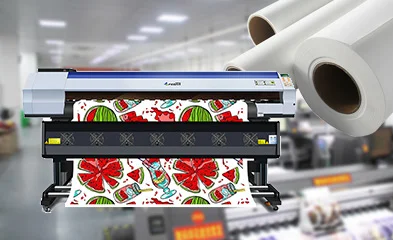
When a printed sample looks right on a small panel, it is tempting to move straight into bulk production. That shortcut causes trouble in polyester fabric printing because bulk rolls carry more width, more tension, and more repeated artwork than a swatch. A wide format sublimation printer can only reproduce the approved result if the file, fabric and transfer steps are already aligned.
For textile sublimation printing, the useful questions start before the first roll is loaded. Is the original file large enough? Does the repeat size still work after enlargement? Does the fabric width leave enough room for selvedge, skew correction and cutting? The answers shape RIP setup, paper choice, heat transfer capacity, and the way the order can be repeated months later.
Why Sample Approval Is Only the First Checkpoint
A sample is usually printed on a short length, watched closely by the operator, and checked under a limited set of conditions. Bulk fabric orders behave differently. The roll is longer, the paper runs for a longer time, the edge tension changes, and small layout mistakes become visible after several repeats. That is why sample approval should be treated as a color and hand-feel reference, not as proof that the whole order is ready.
The first roll matters almost as much as the sample. It reveals whether the artwork remains aligned over length, whether the printed edge stays clean, and whether the heat transfer side can keep pace with the print schedule. If the first roll is not recorded well, a later reorder may look close at first glance but drift in scale, tone, or margin position. Production teams need a clear standard: approved sample, first-roll photo, RIP file version, fabric width, paper width, transfer condition, and final packing note.
This is also where equipment information should be tied to the order, not left as a separate brochure item. For example, CF-8000 supports 1900 mm print width and multiple pass choices, but those specifications only help when the artwork and fabric data have already been checked against the final roll size.
What Artwork and Fabric Data Should Be Confirmed First?
The original artwork file is the starting point. A production file should not be judged only by how it looks on screen. Its resolution, color mode, repeat size, pattern direction and enlargement ratio all affect the printed roll. A digital textile printer can place ink accurately, but it cannot repair a low-resolution source file or a repeat that was never built for wide fabric.
Fabric data is just as practical. A 1900 mm maximum print width does not mean every fabric can be filled edge to edge. The usable area has to allow for fabric edge variation, left and right margins, cutting allowance, possible skew correction, and the width needed by the transfer process. Soft signage may need different allowance than apparel panels. Home textile panels may need closer repeat matching across seams.
|
Item to confirm |
Why it matters before bulk production |
|
Original artwork file |
Checks resolution, layers, color mode, and whether the source file can scale cleanly. |
|
Repeat size and direction |
Keeps the visual layout consistent when the design runs across long fabric rolls. |
|
Fabric width and usable width |
Prevents edge loss, cutting shortage, and mismatch with the printable area. |
|
Margin and cutting allowance |
Leaves room for selvedge, skew correction, finishing, and panel cutting. |
|
Sample and first-roll record |
Gives the team a reference for color, scale, transfer setting, and reorder control. |
Where Repeat Pattern Printing Usually Creates Risk
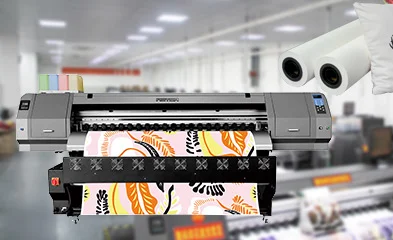
Repeat pattern printing becomes risky when a design is approved as a small swatch but used later as a long, continuous roll. The repeat can stretch after enlargement, shift at panel boundaries, or look uneven when the fabric relaxes after transfer. Even a tiny file setup error may appear as a visible band when the pattern is viewed from several meters away.
In textile sublimation printing, this is not only a design issue. Feeding stability, paper drying, fabric tension and heat transfer capacity all affect how the pattern lands. If the print side moves faster than the transfer side can handle, rolls may wait too long, curl at the edge, or move into transfer with different moisture conditions. If the transfer calendar or heat press width is narrower than the printed layout, trimming waste and scheduling pressure rise quickly.
Color risk sits beside layout risk. A small color sample may pass, then the first bulk roll may show a slightly different black, red, or deep blue because the ink load, drying time, paper batch, or transfer temperature changed. Changfa teams can connect this check to a previous color consistency article, but the production file should still carry its own color note and approval record.
How CF-8000 Helps With Bulk Fabric Orders
A wide format sublimation printer is often judged by speed, yet CF-8000 is more useful when its speed choices are connected with the order type. The machine offers 2 PASS at 120 m2/h, 3 PASS at 85 m2/h, 4 PASS at 65 m2/h, and 6 PASS at 45 m2/h. These modes give production teams room to balance output, ink coverage, and the level of detail needed for apparel fabric, home textile panels, or soft signage. More printer options are available in the printer category.
For a digital textile printer used in bulk work, the print width matters because many problems start at the edge. CF-8000 lists a 1900 mm print dimension and 1900 mm maximum print width. That makes it suitable for polyester fabric printing orders where the team needs a wide layout, but the actual usable width still depends on the fabric, paper and finishing plan. CMYK ink setup also makes color records important. A color target that is accepted in 4 PASS, for example, should not be silently moved to another pass mode without another check.
Workshop conditions should not be ignored. The product page lists a 3070 mm x 1090 mm x 1610 mm machine size, 800 kg weight, 200 V voltage, and an operating environment of 20-30 C with 35%-65% humidity. Ink and transfer materials need the same discipline. Pairing the printer with suitable sublimation ink and a matched heat transfer machine gives the order a better chance of staying stable from print to transfer.
What to Send Before an RFQ or Production Kickoff
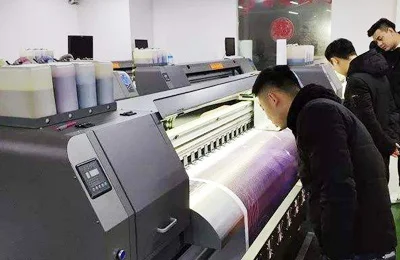
A digital textile printer quotation becomes clearer when the supplier receives real production data instead of a general product name. Send the original file or a clear technical preview, final fabric application, target roll width, expected quantity, repeat size, pattern direction, and approved color sample. If the job is a reorder, include the previous file version, pass mode, paper and ink record, transfer condition, and any issue seen during cutting or sewing.
For textile sublimation printing, production teams should also state whether the order is for sportswear, fashion fabric, curtains, home textile panels, flags, backdrops, or soft signage. Each application creates a different tolerance for edge loss, viewing distance, color difference and seam matching. The same design may be acceptable for a banner but too loose for garment panels that need accurate placement.
For polyester fabric printing, fabric behavior matters as much as image quality. Stretch fabric, bird-eye fabric, double-sided fabric and heavier home textile material do not feed or transfer in exactly the same way. When sharing project details, include fabric composition, width, weight, roll length, cutting plan, transfer equipment, delivery schedule and whether repeat orders are expected. That information helps Changfa Digital review the order as a full production path, not just a machine selection.
Conclusion
Bulk fabric printing becomes more predictable when artwork, repeat size, usable width, margins, sample approval, first-roll records, ink, paper and transfer conditions are confirmed before production starts. CF-8000 gives production teams a 1900 mm platform and selectable pass speeds, but the best result still depends on the file and fabric data around the machine.
Before confirming a bulk order, prepare the artwork file, fabric width, final application, target quantity, approved sample standard and reorder expectation. Those details give Changfa Digital enough context to review print width, pass mode, color records, transfer matching and workshop requirements with fewer late corrections.
FAQ
Q1: Why does repeat pattern printing need extra checking before bulk runs?
A1: A short sample can hide layout drift. Bulk rolls make repeat size, direction, edge margin, fabric tension and transfer timing more visible, so the first roll and reorder records should be checked before full output continues.
Q2: Is 1900 mm print width enough for every 1900 mm fabric order?
A2: Not always. The usable printed area should leave allowance for selvedge, skew correction, cutting, finishing and transfer width. The fabric may be 1900 mm wide, but the safe layout is often narrower.
Q3: Which production details should be kept for repeat orders?
A3: Keep the final artwork file, RIP version, pass mode, ink and paper record, fabric width, transfer temperature or calendar setting, approved sample, first-roll photo and any margin or cutting notes from the first batch.


