


Phone:+86-15215969856 E-Mail: 396838165@qq.com

고속 승화 프린터는 용지 출력에서는 높은 수치를 보여줄 수 있지만, 폴리에스터 원단 인쇄는 프린터 자체의 성능에만 좌우되는 경우가 드뭅니다. 인쇄 모드, 건조 속도, 잉크 공급, RIP 워크플로우, 용지 공급, 열전사 용량, 그리고 일상적인 유지보수까지 모든 요소가 생산 라인의 연속성과 가동 중단 여부를 결정합니다. Changfa 디지털 이러한 작업은 더 넓은 생산 맥락에서 이루어지며, 프린터 선택은 소모품 및 전송 워크플로와 함께 고려해야 합니다.
스포츠웨어 패널, 팀 유니폼, 소프트 사인, 홈 텍스타일, 그리고 긴 원단 롤 등의 생산에서 안정적인 생산량은 일반적으로 프린터와 소모품, 전사 공정, 그리고 작업 루틴을 적절히 조합함으로써 확보됩니다. 물론 빠른 프린터도 도움이 되지만, 승화 인쇄 라인의 나머지 부분이 제대로 작동하지 못하면 일일 생산량은 여전히 부족할 수밖에 없습니다.
프린터 정격 속도와 실제 출력 속도가 다른 이유는 무엇입니까?
정격 속도는 일반적으로 특정 조건에서 측정됩니다. 하지만 실제 생산 환경은 훨씬 복잡합니다. 디자인 변경, 원단 폭 변경, 용지 롤 장력 변화, 그리고 작업자가 청소, 파일 확인 또는 전사 준비를 위해 라인을 일시 중지해야 하는 경우 등 다양한 변수가 발생합니다. 따라서 공장에서는 최고 속도 수치뿐만 아니라 실제 사용 가능한 생산량을 고려해야 합니다. 섬유 승화 프린터는 전체 생산 라인 내에서 어떻게 작동하는지를 기준으로 평가해야 합니다.
통과 모드 및 사용 가능 속도
인쇄 모드는 가장 먼저 확인해야 할 사항 중 하나입니다. 프린터는 1회 인쇄가 가장 빠를 수 있지만, 색상 안정성, 디테일 향상 또는 까다로운 패턴의 안전한 출력이 필요한 경우 2회 또는 3회 인쇄를 선택할 수 있습니다. 핵심은 "가장 빠른 속도는 얼마인가요?"가 아니라 "이 주문에 실제로 어떤 인쇄 모드가 사용될까요?"입니다. 대부분의 작업이 팀 유니폼 패널, 깃발 또는 대형 그래픽이 포함된 소프트 사인이라면 가장 빠른 모드가 항상 정답은 아닐 수 있습니다.
아트워크 복잡성 및 RIP 대기열
단순한 반복 로고는 전체에 적용되는 대형 디자인과는 워크플로우에 미치는 영향이 다릅니다. 파일 중첩, 색상 관리, 해상도, RIP 대기 시간 등은 프린터가 작동하기 전부터 생산 라인의 속도를 저하시킬 수 있습니다. 특히 바쁜 작업장에서는 RIP 스테이션 하나가 막히면 고속 승화 프린터가 대기 상태에 놓일 수 있습니다. 이는 작업자가 같은 근무 시간 동안 여러 가지 소량의 단체복, 다양한 그래픽, 또는 긴급 샘플 파일을 준비할 때 흔히 발생하는 문제입니다.
원단 폭 및 롤 취급
인쇄 폭 또한 실제 생산량에 영향을 미칩니다. 좁은 롤은 다루기 쉽지만 롤 교체 횟수가 늘어날 수 있습니다. 넓은 원단은 한 번의 인쇄로 더 많은 양을 인쇄할 수 있지만, 안정적인 공급과 적절한 전사 폭이 필요합니다. 폴리에스터 원단 인쇄의 경우, 구매자는 프린터 폭, 전사기 폭, 롤 용지 폭, 원단 폭, 그리고 주문 구성에 포함된 일반적인 제품 크기를 비교해야 합니다. 어느 한 부분이 다른 부분보다 좁으면, 그 부분이 일일 생산량의 병목 현상이 될 가능성이 높습니다.
프린터 주변에서 어떤 병목 현상이 발생하나요?
승화 인쇄 라인의 속도가 느려지면 프린터 자체를 먼저 탓하는 경우가 많습니다. 하지만 실제로는 용지 건조, 잉크 공급, 용지 공급 안정성, 열전도 용량, 작업자의 조작 시간 등 프린터 주변의 다른 요인들이 원인일 수 있습니다. 항상 더 빠른 기계를 구입하는 것이 해결책은 아닙니다. 때로는 라인의 성능을 최적화하는 것이 중요합니다.
종이 건조 지연
승화용지가 선택한 속도에 맞춰 충분히 빨리 마르지 않으면 작업자는 속도를 늦추거나, 용지를 감기 전에 기다리거나, 번짐 현상을 감수해야 합니다. 특히 넓은 면적의 그래픽, 큰 색상 블록 또는 습도가 높은 작업 환경에서 이러한 문제가 두드러집니다. 빠른 인쇄 속도를 위해서는 잉크를 제대로 흡수하고 생산 속도에 맞춰 건조되는 용지가 필요합니다. 실제 생산 라인에서 용지 건조는 사소한 문제가 아니라 출력 제어의 핵심 요소입니다.
잉크 공급 중단
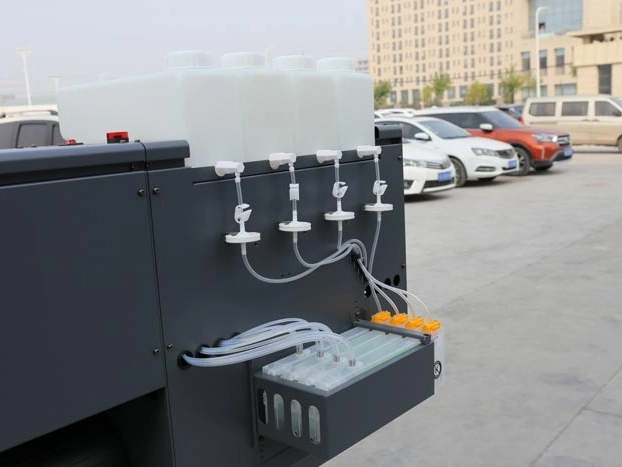
생산 속도가 높아질수록 잉크 흐름은 더욱 중요해집니다. 잉크 공급이 불안정하면 색상 변화, 출력 불량, 반복적인 노즐 유지보수 등의 문제가 발생할 수 있습니다. 특히 여러 개의 원단 롤이 대기 중인 경우, 짧은 정지조차도 예정된 전사 작업에 차질을 초래할 수 있습니다. 승화 프린터 설정에서는 노즐 유형, 패스 모드, 색상 요구량, 환경 조건, 유지보수 루틴과 함께 잉크량을 점검해야 합니다. 안정적인 잉크 공급은 장시간 작업 중 발생할 수 있는 예상치 못한 문제들을 줄여줍니다.
열전달 용량
인쇄 속도를 높이는 것만으로는 큰 도움이 되지 않습니다. 열전사 과정에서 인쇄된 롤을 같은 속도로 받아들일 수 없기 때문입니다. 전사 온도, 시간, 압력, 기계 폭 모두 라인 밸런스에 영향을 미칩니다. 프린터는 롤을 완성하지만, 열전사 과정에서는 그렇지 못합니다. 열전달 기계 또는 후처리 과정이 속도를 따라가지 못할 수도 있습니다. 이러한 문제가 자주 발생하는 경우, 출력 계획에는 프린터 용량과 전송 용량 모두를 고려해야 하며, 특정 장비 하나만 고려해서는 안 됩니다.
소모품 및 이송 설정이 생산 라인 안정성에 어떤 영향을 미치나요?
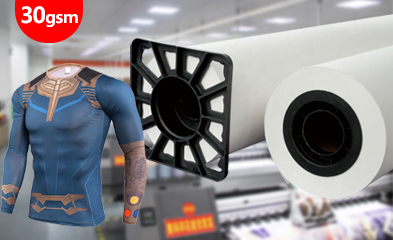
소모품은 단순히 구매 품목이 아닙니다. 실제 작업에서 프린터 속도를 얼마나 활용할 수 있는지를 결정하는 중요한 요소입니다. 용지, 잉크, 전사 설정은 함께 테스트해야 하는데, 한 부분의 변화가 다른 부분의 결과에도 영향을 미칠 수 있기 때문입니다. 승화 프린터 설정은 일반적인 사양 목록만 보고 선택하는 것이 아니라 실제 작업에 맞춰 소모품을 선택할 때 더욱 안정적으로 작동합니다.
승화용지 건조 성냥
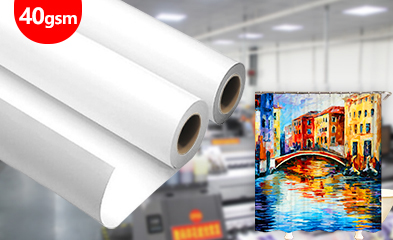
연속 디지털 섬유 인쇄의 경우 용지는 프린터 속도, 잉크량, 작업장 습도 및 전사 시간과 완벽하게 일치해야 합니다. 용지가 너무 느리게 마르면 인쇄 라인이 지연됩니다. 잉크를 잘 흡수하지 못하면 이미지 선명도나 전사 품질이 저하될 수 있습니다. 실제 디자인 유형과 인쇄 모드를 사용하여 용지를 테스트하는 것이 좋습니다. 소규모 테스트에는 색상 블록, 가는 선, 어두운 영역, 그리고 주문에 사용된 원단 유형을 포함해야 합니다.
잉크 흐름 및 색상 연속성
잉크는 짧은 샘플 인쇄뿐 아니라 긴 인쇄 시간 동안에도 원활하게 흘러야 합니다. 사이클링 저지, 팀 유니폼, 롤업 배너, 홈 텍스타일 패널과 같은 작업에서는 롤 간 색상 차이가 나중에 고객 불만으로 이어질 수 있습니다. 색상 연속성 관리가 이미 어려워졌다면 잉크 종류, 보관 방법, 온도, 노즐 상태, 세척 루틴, RIP 색상 설정 등 전체 잉크 경로를 점검해야 할 시점입니다. 승화 잉크 측면 문제는 프린터 속도를 다룰 때와 마찬가지로 신중하게 논의해야 합니다.
이송 온도 및 시간
전사 설정은 인쇄된 용지를 최종 직물 결과물로 변환하는 과정입니다. 온도, 시간 또는 압력이 안정적이지 않으면 직물 색상이 옅어지거나, 패널이 고르지 않게 나오거나, 잔상이 남거나, 반복 인쇄가 고르지 않게 나올 수 있습니다. 따라서 프린터는 열전사 공정에서 별도로 선택해서는 안 됩니다. 창파 디지털 제품 센터 이 자료는 승화 용지, 프린터, 승화 잉크, 열전사기, 티슈 페이퍼를 포함한 광범위한 제품 시스템을 보여줍니다. 생산 라인을 구축하거나 조정하는 공장의 경우, 단일 사양서보다 이러한 제품 구성이 훨씬 더 중요합니다.
CF-6000은 고속 폴리에스터 원단 인쇄를 어떻게 지원합니까?
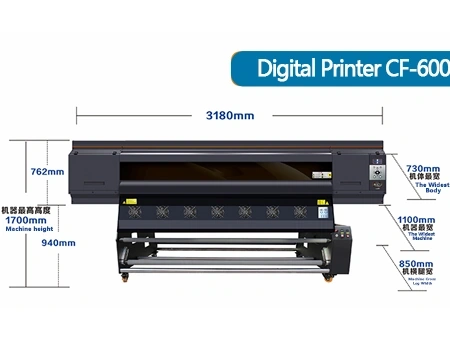
적합한 기계는 생산 라인의 속도를 저하시키는 일반적인 약점을 줄여야 합니다. 폴리에스터 직물을 위한 디지털 프린터 CF-6000 디지털 인쇄 이 페이지는 라인 계획에 필요한 실질적인 데이터(최대 인쇄 폭 1900mm, CMYK 잉크 설정, 1 PASS, 2 PASS, 3 PASS 모드에서의 다양한 생산 속도)를 제공하므로 해당 맥락에서 논의할 가치가 있습니다.
원단 작업에 더 넓은 형식
최대 1900mm의 인쇄 폭은 폴리에스터 원단 롤, 소프트 사인, 홈 텍스타일 또는 대형 스포츠웨어 패널을 처리할 때 유용합니다. 더 넓은 포맷은 불필요한 레이아웃 분할을 줄일 수 있지만, 실제 원단 롤과 전사 장비의 규격을 확인해야 합니다. 하류 전사 장비의 폭이 동일한 범위로 준비되지 않으면 더 넓은 인쇄 용량을 최대한 활용할 수 없습니다. 따라서 업그레이드 전에 인쇄 폭과 전사 폭을 함께 확인해야 합니다.
주문 유형별 처리 속도
CF-6000은 1패스 시 시간당 200㎡, 2패스 시 시간당 110㎡, 3패스 시 시간당 75㎡의 처리량을 제공합니다. 이러한 수치는 구매자가 최고 수치뿐만 아니라 다양한 작업 모드를 비교할 수 있도록 도와줍니다. 단순한 그래픽의 홍보 배너와 같은 경우에는 생산량 압박으로 인해 빠른 모드가 적합할 수 있습니다. 반면, 정교한 의류 패널이나 색상에 민감한 반복 작업의 경우에는 느린 모드가 더 안전할 수 있습니다. 적절한 모드 선택은 주문 유형, 품질 목표, 그리고 일일 생산 일정에 따라 달라집니다.
잉크 공급, 건조 및 급지 지원
CF-6000에는 연속 잉크 공급, 지능형 공기 가열 건조, 자동 세척 및 가습, 장력 공급 시스템 등 생산 라인 안정성에 중요한 기능들이 포함되어 있습니다. 이러한 세부 사항들은 폴리에스터 원단 장시간 인쇄 작업에서 발생하는 작은 중단으로 인해 생산 속도가 저하되는 경우가 많기 때문에 중요합니다. 안정적인 잉크 공급, 건조 및 급지를 지원하는 기계는 예기치 않은 생산 중단을 줄이는 데 도움이 될 수 있습니다. 작업자의 점검 필요성을 완전히 없애는 것은 아니지만, 생산 라인이 더욱 안정적으로 운영될 수 있는 기반을 제공합니다.
송전선로를 건설하거나 업그레이드하기 전에 무엇을 확인해야 할까요?
고속 프린터는 생산 라인 환경을 명확히 파악한 후에 선택해야 합니다. 장비 주문 전에 공장에서는 제품 유형, 출력 목표, 소모품, 이송 장비 및 서비스 지원을 연관시킨 간단한 체크리스트를 작성해야 합니다. 이렇게 하면 특정 기계 이름표에 얽매이지 않고 실제 출력 환경을 고려한 논의를 진행할 수 있습니다.
인쇄 폭 및 전사 폭
첫 번째 점검 사항은 간단합니다. 프린터, 용지 롤, 원단 롤, 전사 기계의 폭 범위가 일치하는지 확인하는 것입니다. 일치하지 않으면 추가적인 재단, 되감기 또는 레이아웃 조정이 필요할 수 있습니다. 이 점검은 특히 소프트 사인, 홈 텍스타일, 긴 원단 롤을 사용하는 제품에 중요합니다. 폭 불일치는 샘플링 과정에서 사소한 불편함처럼 보일 수 있지만, 같은 문제가 매일 반복되면 비용이 많이 드는 문제가 됩니다.
용지와 잉크 매칭
새로운 프린터는 기존 프린터와 용지 및 잉크 특성이 다를 수 있습니다. 용지는 선택한 속도에 맞춰 건조되어야 하고, 잉크는 선택한 프린트 헤드를 통해 원활하게 흘러야 하며, 색상은 반복 인쇄 시에도 일정하게 유지되어야 합니다. 섬유 승화 프린터와 관련 소모품을 비교하는 구매자의 경우, 일반적으로 가장 중요한 논의 사항은 프린터와의 호환성, 샘플 확인, 그리고 반복 생산의 안정성입니다.
유지보수 및 서비스 대응
유지보수 계획은 구매 논의에 포함되어야 합니다. 노즐 세척, 보습, 예비 부품, 작업자 교육 및 서비스 대응은 모두 생산 라인 가동 시간에 영향을 미칩니다. 이러한 사항들을 설치 후에 고려한다면, 초기에는 문제가 없어 보일지라도 실제 주문량 증가 시 불안정해질 수 있습니다. 창파 디지털은 코팅, 슬리팅, 포장 및 수출 배송 분야에서도 공급 능력을 갖추고 있어 장비 논의와 소모품 매칭이 필요한 프로젝트를 효과적으로 지원할 수 있습니다.
결론
승화 인쇄 라인은 프린터 속도, 건조, 잉크 공급, RIP 워크플로, 용지 공급, 열전사 및 유지 보수가 하나의 시스템으로 제대로 작동하지 않을 때 속도가 저하됩니다. CF-6000은 더 넓은 포맷, 더 높은 생산량, 그리고 안정적인 라인 연동이 필요한 폴리에스터 원단 디지털 인쇄 프로젝트에 적합합니다.
창파 디지털은 승화 용지, 승화 잉크, 열전사 장비, 티슈 페이퍼 및 생산 지원을 제공함으로써 생산 팀이 프린터를 별도의 구매 품목으로 취급하는 대신 전체 전사 워크플로우에 맞춰 프린터를 활용할 수 있도록 지원하는 데 더욱 유리한 위치에 있습니다.
인쇄, 건조 및 전사 과정에서 이미 지연이 발생하고 있는 공장, 유통업체 또는 프로젝트 팀의 경우, 다음 단계는 단순히 더 빠른 프린터를 요청하는 것만이 아닙니다. 전체 라인 상태를 검토해야 합니다. 창파디지털에 생산 라인 요구사항을 알려주세요. 프린터 폭, 인쇄 모드, 소모품, 열전도 용량 및 장기 공급 계획에 대해 논의합니다.
FAQ는
Q1: 승화 인쇄 라인의 속도를 가장 먼저 저하시키는 것은 일반적으로 무엇입니까?
A1: 일반적인 원인으로는 용지 건조 지연, 불안정한 잉크 공급, RIP 대기열 압력, 전송기 용량 및 정기 유지 보수 중단 등이 있습니다.
Q2: 공장은 항상 가장 빠른 통과 모드를 선택해야 할까요?
A2: 1차 패스는 더 높은 출력량을 지원할 수 있지만, 색상 안정성, 디테일 및 반복 작업에는 2차 또는 3차 패스가 더 좋을 수 있습니다.
Q3: 창파 디지털은 승화 프린터 설치를 어떻게 지원하나요?
A3: 창파 디지털은 CF-6000 프린터 선택은 물론 승화 용지, 잉크, 열전사 장비 및 라인 매칭 상담을 지원합니다.


