


HOT SALE
APPLICATION

Phone:+86-15215969856 E-Mail: 396838165@qq.com
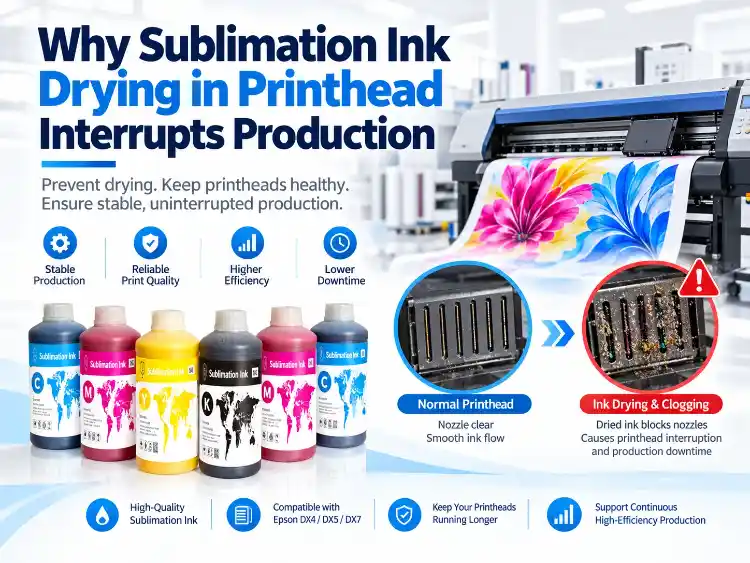
Monday morning often exposes the problem best. A printer that completed a full shift on Friday returns a broken nozzle check before the first fabric panel moves. Sublimation ink drying in printhead channels can be the cause, but the failure rarely begins at the exact moment the operator notices missing dots.
Drying develops while the machine is stopped. Ink at the nozzle plate loses the motion that keeps its components evenly distributed, air reaches the exposed surface, and the fluid begins to concentrate. The result may be a sticky film, a partially restricted channel, or a hardened deposit. Each produces a different recovery pattern, which is why one cleaning cycle can fix a mild case and do nothing for a mechanical ink-supply fault.
Why Drying Starts Where the Ink Stops Moving
Idle Time, Cap Seal, and Air Exposure
The capping station limits evaporation during downtime. A cap with dried residue, a weak spring, or a small alignment error leaves a path for air around the nozzle plate. Equipment used through the week may tolerate that weakness without a visible result. A weekend break changes the duration of exposure, and a holiday shutdown changes it again.
The important record is not only total idle hours. The condition of the cap at startup, the parking position, and the last nozzle check before shutdown all affect what happens during the pause.
Room Heat, Dry Air, and Local Airflow
Two printers can use the same ink and still dry at different rates. A unit near a drying oven, loading door, heater, or strong fan sits in a local climate that a room sensor may not describe. Warm, dry, fast-moving air increases evaporation at the nozzle surface. Dust adds another variable because particles can collect around the cap and nozzle area.
Use several readings around the machine when the problem repeats. If the nozzle pattern fails only after seasonal changes or overnight cooling, the room condition is part of the production history.
Ink Chemistry Meets a Specific Printhead
Carrier chemistry, glycol balance, filtration, and dye loading affect how an ink behaves when circulation stops. Printhead architecture adds its own constraints. Epson DX4, DX5, and DX7 heads appear in different machine families, but the cap station, ink line, damper, and maintenance sequence can still differ. A shared head name does not create one universal drying interval.
That boundary matters during troubleshooting. An ink listed for one printer family cannot be assumed to match another family, and a maintenance routine copied from a different machine may not protect the actual ink path.
How to Separate Dried Ink from Ink-Supply Faults
Nozzle Patterns That Recover Unevenly
Print a nozzle check and save it. A blockage tied to drying often appears as the same missing nozzles before and after one controlled cleaning. A pattern that improves and then returns after several passes points toward pressure loss, air in the line, or an unstable supply before the head is treated as permanently clogged.
Repeated cleaning becomes expensive when it treats the wrong cause. It consumes ink, heats the printhead, and can introduce more air without restoring a stable channel.
Dampers, Filters, Cartridges, and Air
Inspect the path from bottle to nozzle. A restricted filter, aging damper, loose cartridge seal, low ink level, or trapped air pocket can resemble sublimation ink drying in printheads at the nozzle check. A clean cap and a full bottle do not prove that the line delivers ink under stable pressure.
Replace only the parts supported by the printer design and maintenance history. Record the part age, the nozzle result before replacement, and the result afterward. When the printer family or consumable format changes, check the product center before carrying assumptions into the repair. That comparison shows whether the repair addressed the cause or merely changed the symptom.
A Diagnostic Image with More Than Text
A narrow test strip with solid CMYK blocks, fine lines, gradients, and repeated marks gives more information than a text page. The solid blocks show drop volume, fine lines expose missing nozzles, and repeated marks reveal drift across the page. Keep a known-good sample from the same printer for direct comparison.
What Epson Printhead Families Change
Build a Machine-Specific Baseline
Sublimation ink drying in printhead Epson checks start with the exact printer model, not a generic Epson label. Record the head family, cap design, ink-delivery route, normal cleaning result, and the longest idle period the machine has already passed. This baseline turns future nozzle checks into a comparison rather than a guess.
Match the Ink Series Without Guessing
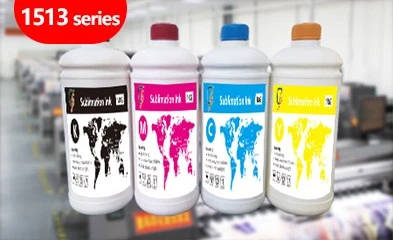
The listed ink for CF-2000 and CF-3000 printers is 1513 Series. CF-6000 and CF-8000 families use 1962 Series, while Model-xplus-8 and CF-15000 use 1983 Series. The exact product page remains the authority because compatibility also depends on the cap, filter, damper, and ink line.
Keep Maintenance Parts in the Same Record
A change in ink also changes the maintenance record. Note the series, batch, filter installation date, damper replacement, cleaning frequency, and any recurring nozzle position. A pattern that follows one batch is a different problem from a pattern that follows one printer or one room condition.
A Shutdown and Restart Routine That Produces Evidence
Daily and Weekly Movement
Short maintenance prints keep fresh ink at the nozzle plate. A compact CMYK strip and several fine lines exercise each channel without consuming a production-size sheet. Weekly checks add the cap, wiper, ink path, and room readings. The routine is not a guarantee against every blockage; it gives the team earlier evidence when one begins.
Cap, Park, and Room Control
Confirm that the head parks correctly and the cap makes clean contact. Remove dried residue from the sealing surface using the approved method. Store the printer away from direct heat, open doors, dust, and concentrated airflow. Stable conditions reduce the rate of change, even when the room is not perfect.
Recovery Without Repeated Cleaning
Run one normal cleaning cycle, print a nozzle check, and compare it with the baseline. When the result stays weak, inspect the cap, wiper, damper, filter, seal, and tubing before another cleaning. A compatible soaking method may help when the ink supplier and printer guidance support it, but random solvents can damage seals and coatings.
When a Long Idle Period Needs a Different Test
How Long Can Sublimation Ink Stay in a Printer?
How Long Can Sublimation Ink Stay in a Printer depends on the machine, ink, cap condition, room, and maintenance history. Machines with a short path and a good seal differ from wide units with long tubes and an older cap. A single number cannot describe both.
Test a Weekend, Holiday, or Seasonal Stop
Reproduce the pause the shop actually plans to take. Leave the machine idle for that period, print the same nozzle pattern, and count how many nozzles recover after one cleaning. Stable recovery means the routine fits that machine. When repeated cleaning is needed, change the cap condition, storage setup, or idle routine before loading a critical order.
A practical answer to How to stop ink drying out in printer workflows comes from measured recovery, not a universal schedule. The same evidence helps the operator decide whether to continue, repair, or escalate the issue to a printhead specialist.
Conclusion
Dried ink, air in the line, a weak cap, and a restricted filter can all interrupt a sublimation printer after downtime. The useful response starts with a controlled nozzle check and a machine-specific baseline. Match the ink series to the actual printer family, keep cap and consumables in condition, and record how the head recovers after every pause.
For a technical review, send the printer model, printhead family, ink series, nozzle pattern, idle duration, room readings, cleaning history, and the point where the defect returns. Changfa Digital can compare those conditions with the applicable ink family and the supported machine path.
FAQs
Q1: Can dried ink cause a nozzle pattern that recovers and then fails again?
A1: Yes. A partial deposit can loosen during cleaning and return after a few passes. Air, pressure loss, or a worn damper can produce a similar pattern, so the ink path needs inspection as well.
Q2: Does every Epson DX4, DX5, or DX7 printer tolerate the same idle period?
A2: No. The head family is only one variable. Cap condition, ink path, room conditions, and maintenance history determine how long a specific machine remains stable.
Q3: What test proves that an ink series fits a printer?
A3: Use the exact machine page to confirm the listed series, then run a nozzle check, a CMYK diagnostic image, and a production-length print. Compare color, flow, recovery, and maintenance demand with the approved baseline.


